
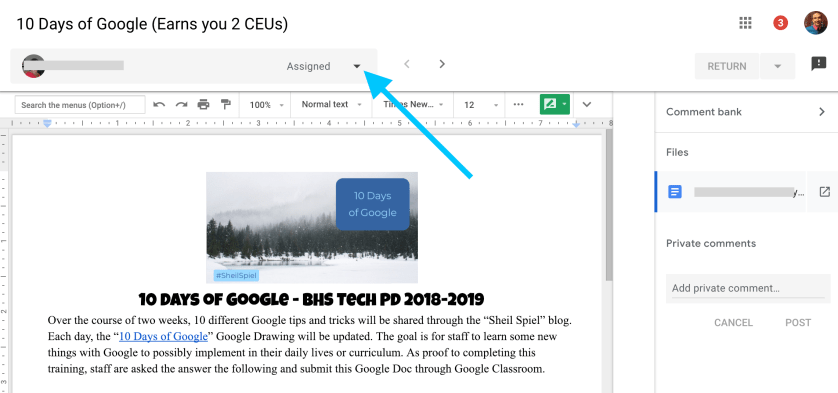
 Today’s topic pertains to Google Classroom and the new grading feature this school year. Now when you open up a file that is shared through Google Classroom, a new grading window shows up. There are some great benefits to this new feature this year.
- Can add generic comments in a comment bank so that you don’t have to type the same thing over and over when assessing work.
- Less opening and closing of windows as all student work can be viewed from the drop down menu on the top left corner. You are able to quickly see where students are at from this drop down as well (missing, turn in, assigned).
Continue reading “Day 5 of Google 2018: Google Classroom Commenting/Grading”
 Today we will focus on YouTube. Let’s face it. Most of us end up on YouTube at least once a day for whatever reason. Maybe one of these three tips will help make your viewing experience that much better.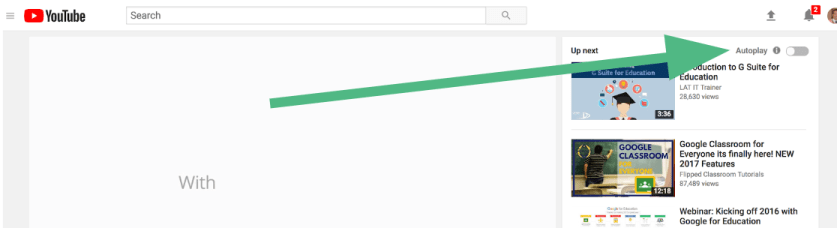
 Use spreadsheets from time to time? Google Sheets now allows users to have checkboxes in a column. It might seem like a small feature but in all honesty, it can be a great visual cue to know who has and has not done a particular task.
 Word clouds have been around for some time. They can be great to help share a message or get a point across in a visual format. There is an add-on with Google Docs that helps users create a Word Cloud with their content.
 About a month ago, Google released a feature with Google Slides that many people didn’t realize that they were missing this feature until it came out. Now, when you are giving a presentation to a group of people, you have the ability to turn on Closed Captioning, or what Google is calling, Captions.
 Craig M Sheil