Last week, I was given an opportunity to give a 20 minute webinar on Bulk Create, a feature in Canva Education, as part of the Canva Education Back to School Learning Series – search for “Bulk Create for the Classroom” – towards the bottom of the list and you will find my recorded session. (I highly recommend folks take a look at the full agenda/recordings of all 19 sessions that were offered for educators to help them get back into the swing of things. Lots of good learning there!) For those that don’t know what Bulk Create is or what it can do…Think name tags, certificates, customized ‘worksheets’, activities or announcement posts. Canva Bulk Create can produce multiple versions of a template in seconds based on the data you provide in the format that you want it in.
The whole opportunity in working with Canva, from start to finish, reminded me about the importance of always pushing yourself to learn new things. Sure, I have been using Canva for many years now. Sure, I have used Bulk Create before. Sure, I have given many trainings over the years. While all of that is true, I took the opportunity to also push myself to learn more advanced features that could be implemented with Canva Bulk Create – especially tied with Canva Sheets. I never even know that I could use Bulk Create when working with images…thought it only worked with text!
My Learnings…
Learning #1: While preparing for this webinar, I stumbled upon this idea that I could use images a part of a Bulk Create action – all organized through a Canva Sheet. This idea was a mind blown moment for me. Just that week, I was planning on putting together a ‘welcome new staff’ announcement for the new teachers in our high school. I had taken their photos or photos of themselves were given to me. I had found an announcement template in Canva that I made a copy of and made necessary adjustments that I wanted to make. Then, with the assistance of Canva Sheets and Canva Bulk Create, I was able to have multiple version of the announcement in seconds – one for each of the new staff members.
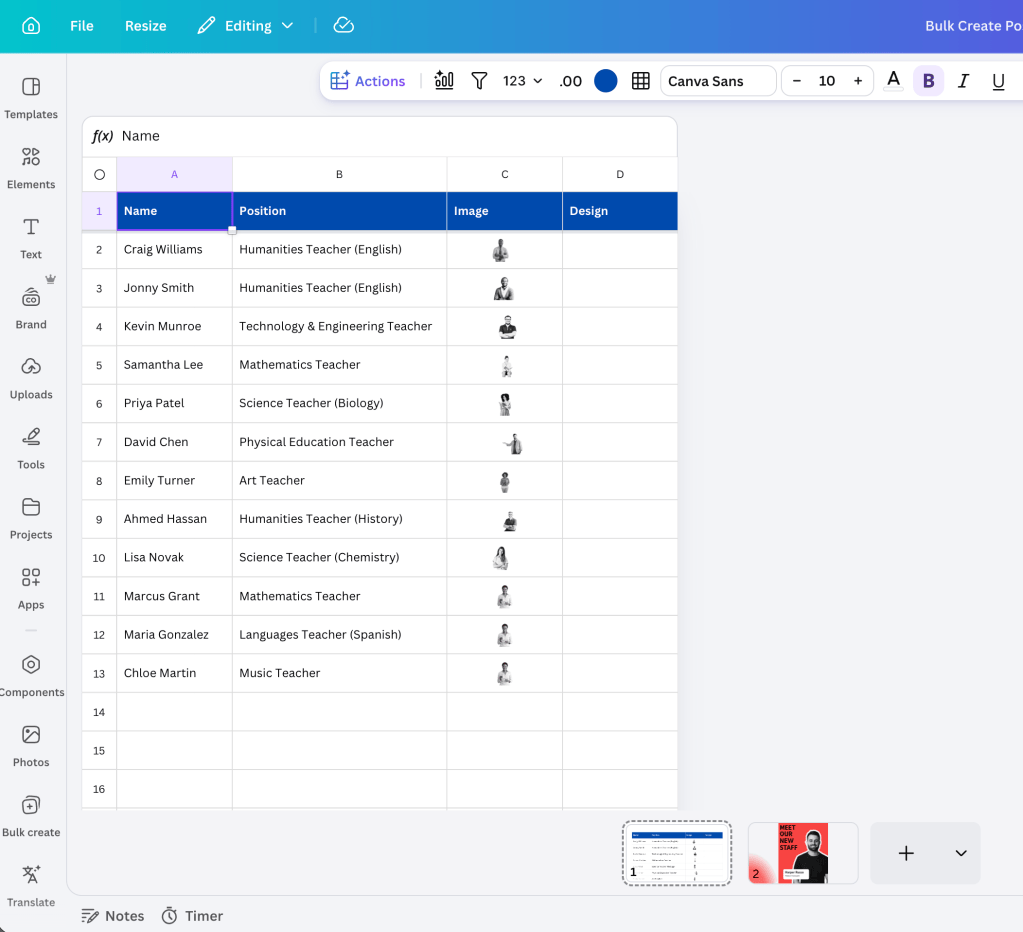
Learning #2: Background remover has to be one of the most used features for educators in Canva Education. I use it almost every time I make something. What I didn’t know was that if I am working with Canva Sheets and I have images located in a column, I can highlight the column and select the BG remover button. Yes, in seconds, all images will then have their backgrounds removed.
Learning #3: Just in terms of the logistics of making sure that the webinar runs smoothly, Canva ensured that there were two other folks in the webinar with me. Ryan kicked off the webinar and explained more about Canva in general. Sarah was there to help moderate the chat and provide links and resources when it was time to provide them. I have to say it was GREAT being able to say, “and right now Sarah will be providing a link to you all.” It was great to see how a business runs sessions and communicates information with end users in an online webinar. It is good to get this perspective especially when we tend to only see what things look like in education.
Final Thoughts…
I’ll be honest…if it wasn’t for me participating in this webinar, I don’t think I would’ve pushed myself to dive deeper with Bulk Create…which would have meant that I would not have had Canva help assist me with creating my ‘Meet the New Staff’ announcements. Furthermore, two practical applications of using Bulk Create would not have been in action either. Since we have been back at school, one teacher had Canva Bulk Create help create character trading cards for their writing course, while another will be having Canva Bulk Create help make visual journaling writing prompts. So important to continue to find ways to push ourselves to learn and grow.
The possibilities are endless. If you would like to learn more, watch the webinar or feel free to reach out. You know where to find me.
And that is my Spiel…
(Oh and by the way…LOVE my new Canva Sweatshirt and socks)