

 Ok, yes…the sound of Netflix went through my mind as I started typing. Each year, Jess Gilcreast (High School librarian), and I think of creative and different ways to provide professional development for the staff that we work with. We have tried it all, or at least seems that way. Whether it is providing ‘learning at your own time’ opportunities through Google Classroom, in person trainings, or online book chats through Twitter. We strive to keep things ‘fresh’ and continuously push the limits.
Continue reading “PDFlix: Providing ‘On Your Time’ PD Opportunities”
 On the tenth day of Google, we will focus on accessibility. Google has been focusing a lot on accessibility and making sure that all students are able to learn and grow with the support of a Chromebook. Google has devoted
  For the ninth day of Google, we will focus on formatting tips and tricks. Have to admit, I did not know about any of these until most recently. It is all about unlearning what you have always done to learn something new. These tips will most certainly save you some time in the future.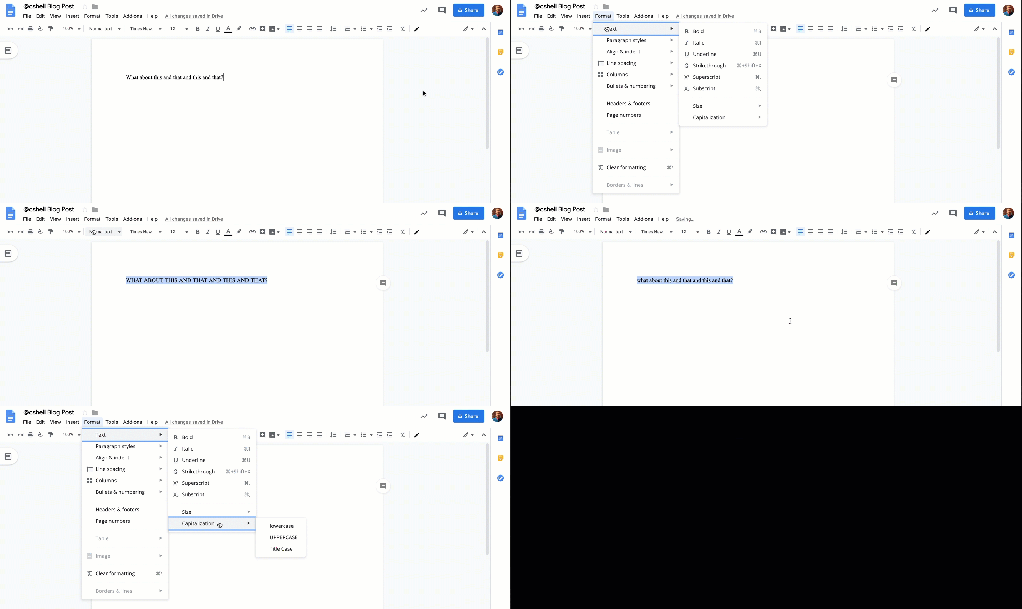
 On this eighth day of Google, we will focus on how students can participate in activities on their Chromebook while in ‘locked mode’. In particular, I want to focus on two different features: Locked mode with Google Forms and Desmos Calculator.
