Part 2: GenAI & Coding Interactive Activities (Comparison of Tools)

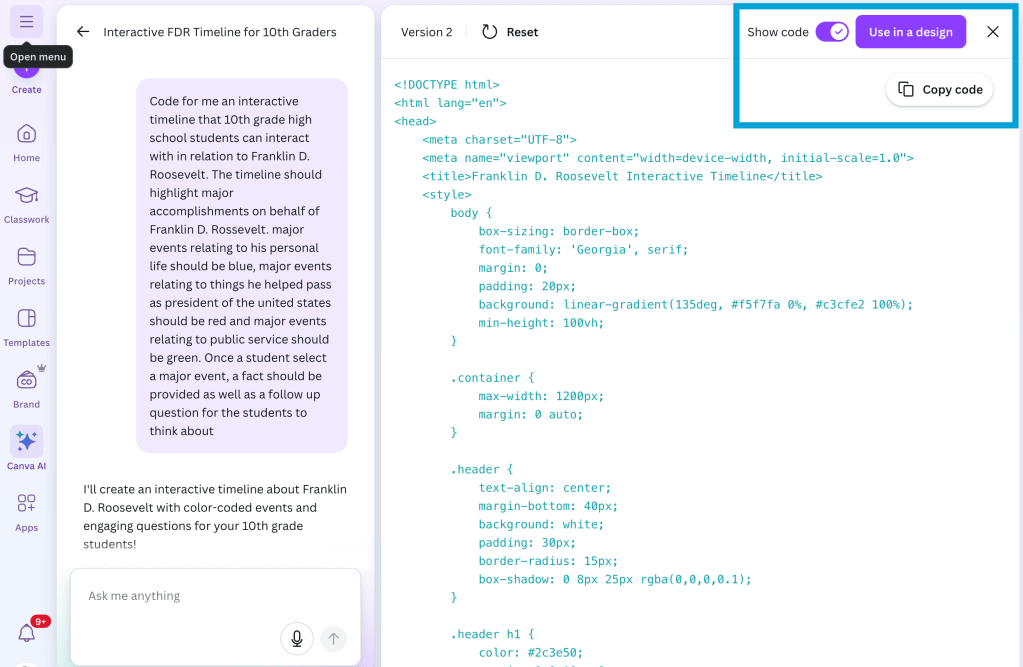
Last month, I wrote a blog post, “Gen AI & Coding Interactive Activities“. I gave three different examples of things that I was trying with Gemini to code for me. Then it dawned on me this week that Canva Code now allows users to copy html code from a prompt in Canva. When Canva Code first came out, this was not available. Now that it is, users are able to copy the code and then provide the interactive activity on a platform other than Canva, such as Google Sites. (One thing that I do like about Canva Code is the ability to hit the use in a design button and choose between what type of file it should live in, within Canva. You can choose Canva website, presentation, doc or whiteboard. However there are times where I think that being able to copy the code and place it on a different platform can be beneficial).

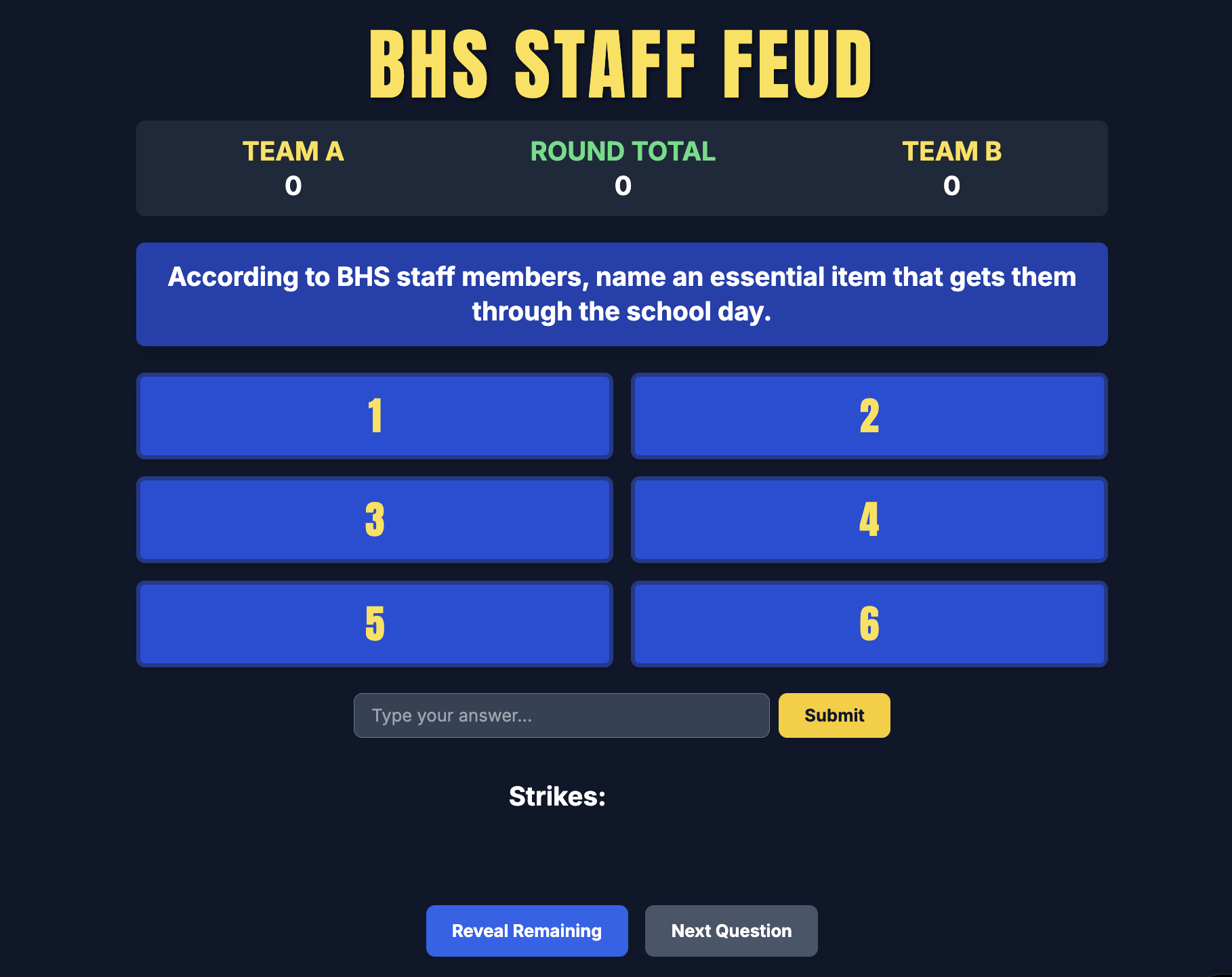
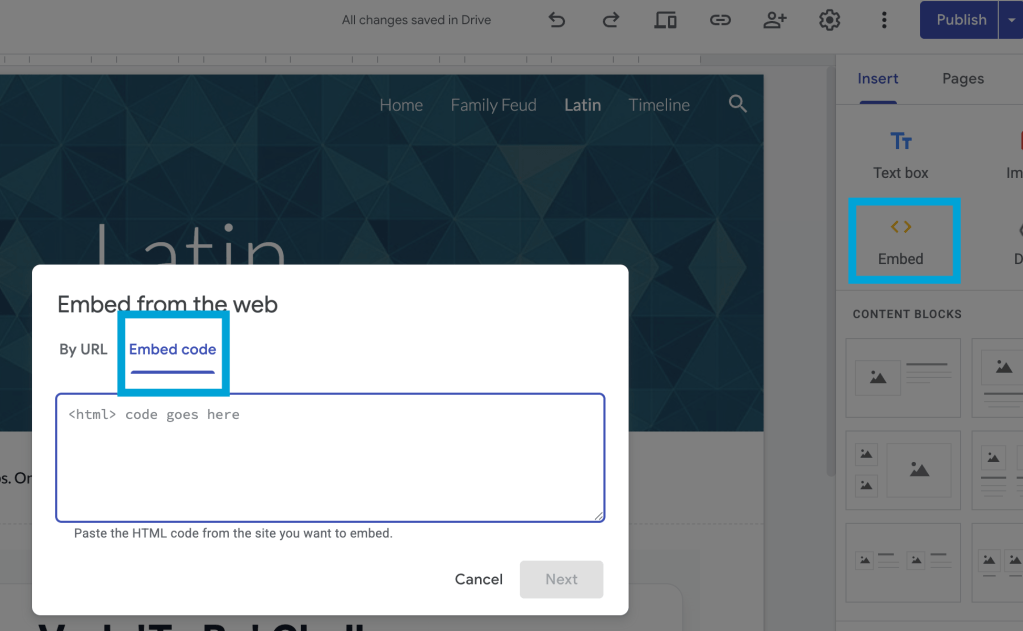
What I decided to do was to take two of the prompts from the previous blog post, the FDR timeline and the Family Feud activity, and put them into Canva Code. I then copied the code for each of them and embedded the interactive activity on the google site that already had Google Gemini’s version of the activity. You can view the sample timeline HERE and the Family Feud activity HERE.

This can be a great learning opportunity for students and teachers. As long as the prompt is exactly the same (I can’t promise mine is 100% the same but it is really close), it could be a great opportunity for students to learn that not all LLM’s are treated or designed the same. I also think it speaks to how working with one model might be good for one reason, but maybe realize not as good for a different reason. Just some food for thought.

For instance, I like how Canva AI interpreted the timeline in a vertical format, rather than how Gemini built it horizontally. I found it interesting that Canva AI used emojis with its timeline whereas Gemini did not. When you look at the Family Feud activity, they are both designed differently with different colors as well as with the organization of work flow of awarding points. Those are just a couple of examples of how even though the prompts are the same (or almost exactly the same), the LLM interpreted the result differently.

This then connects with the idea of if humans are going to work with genAI, they really need to be able to think critically with the tool. Humans need to be thinking about the output. The thinking needs to go beyond is the information right. Humans need to think about, was this information expected, is it organized correctly, is it telling the right story, etc. Critically thinking is important.

And that is my Spiel…

Gen AI & Coding Interactive Activities

This past summer, I had the opportunity to attend a Google Symposium in Chicago. Over the span of the three days, we had an opportunity to learn about what Google is working on, provide some feedback on some future projects, get inspired from one another, and continue to grow our professional learning network. One component that really resonated with me was the capabilities of Google Gemini. While I knew that I could ask Gemini to help assist with many different tasks, one thing that I hadn’t explored was how Gemini can help code an idea or an activity. 

A lightbulb moment happened for me when Andy Caffrey highlighted how he used Gemini to code an interactive activity that we participate in. We walked through the steps that I’m about to walk through with you as to how you can take your idea and ask Gemini to assist in making that idea turn into a reality. Gemini will write some code, you have the ability to preview the activity to see if what was coded is what you were expecting, and then you copy that code and paste in a Google Site. Light bulb moment for me. Over the past couple weeks, I’ve explored around with different ideas, techniques and activities and I hope these ideas will inspire you to think about what you could possibly have Gemini help you out. (Keep in mind that while I am highlighting how Gemini can code, you can do similar tasks in Canva using Canva AI to code interactive activities.)

To view all three examples on a Google Site, click HERE

Coding a Timeline

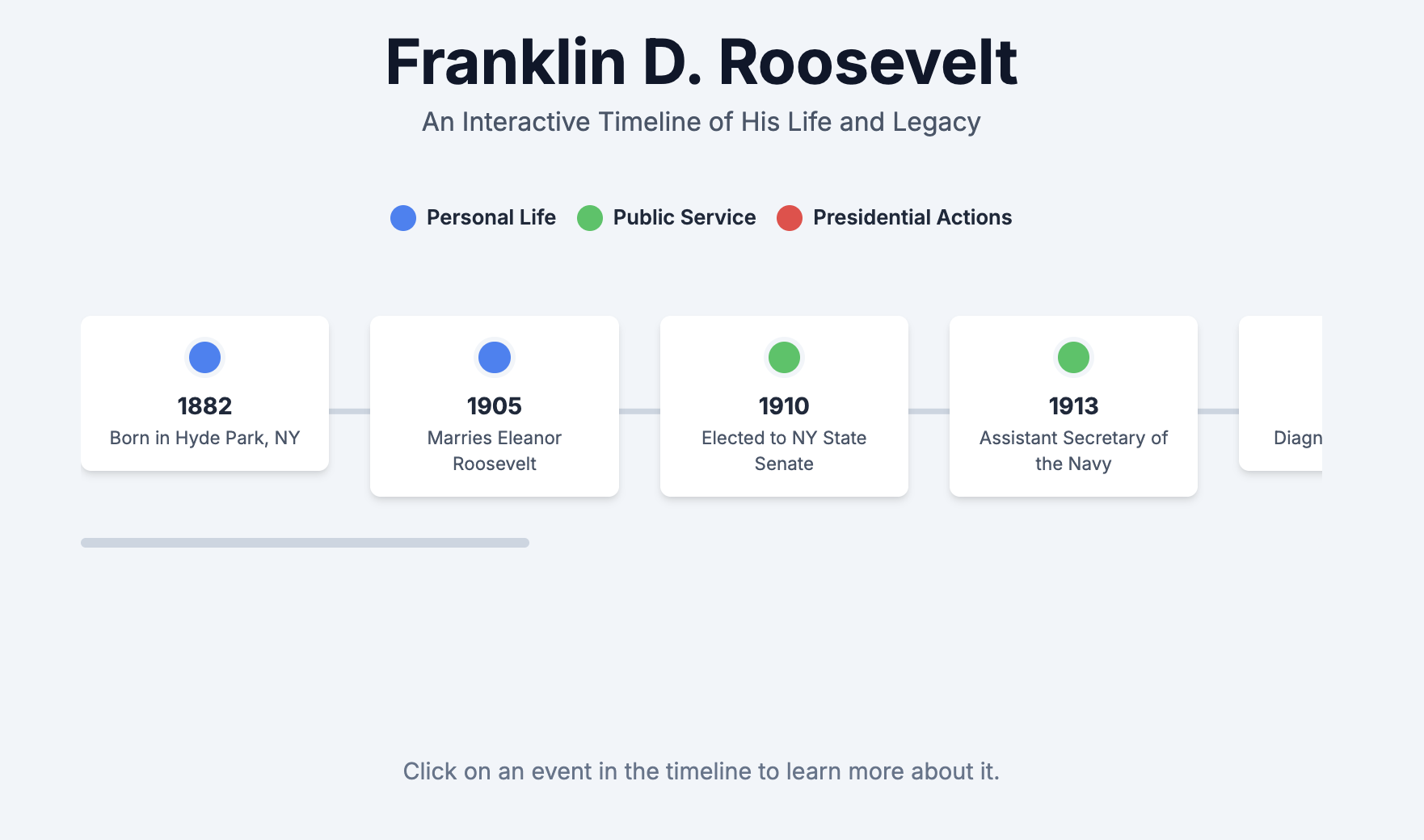
There is a classroom in the high school that has a big timeline of the content that students are learning in their class. It spans from wall to wall. I got to thinking that perhaps we can turn that information into an interactive timeline. I asked Gemini to create an interactive timeline about Franklin D Roosevelt, and the accomplishments that he helped institute from his presidency. Below is an example prompt that I put into Gemini. You can see that I wanted this to be a timeline beyond just students scrolling and seeing different components of FDR. I asked Gemini to design it so that if they actually selected a particular highlight in that timeline they would actually be prompted to answer some questions. I wanted immediate feedback when answer questions as well as providing a food for thought question for them to think about.

“Code for me an interactive timeline that 10th grade high school students can interact with in relation to Franklin D. Roosevelt. The timeline should highlight major accomplishments on behalf of Franklin D. Rossevelt. major events relating to his personal life should be blue, major events relating to things he helped pass as president of the united states should be red and major events relating to public service should be green. Once a student select a major event, a fact should be provided as well as a follow up question for the students to think about.” – prompt with Google Gemini – September 24, 2025

To view the example on a Google Site, click HERE

Self Checker Activity – Interactive Charts

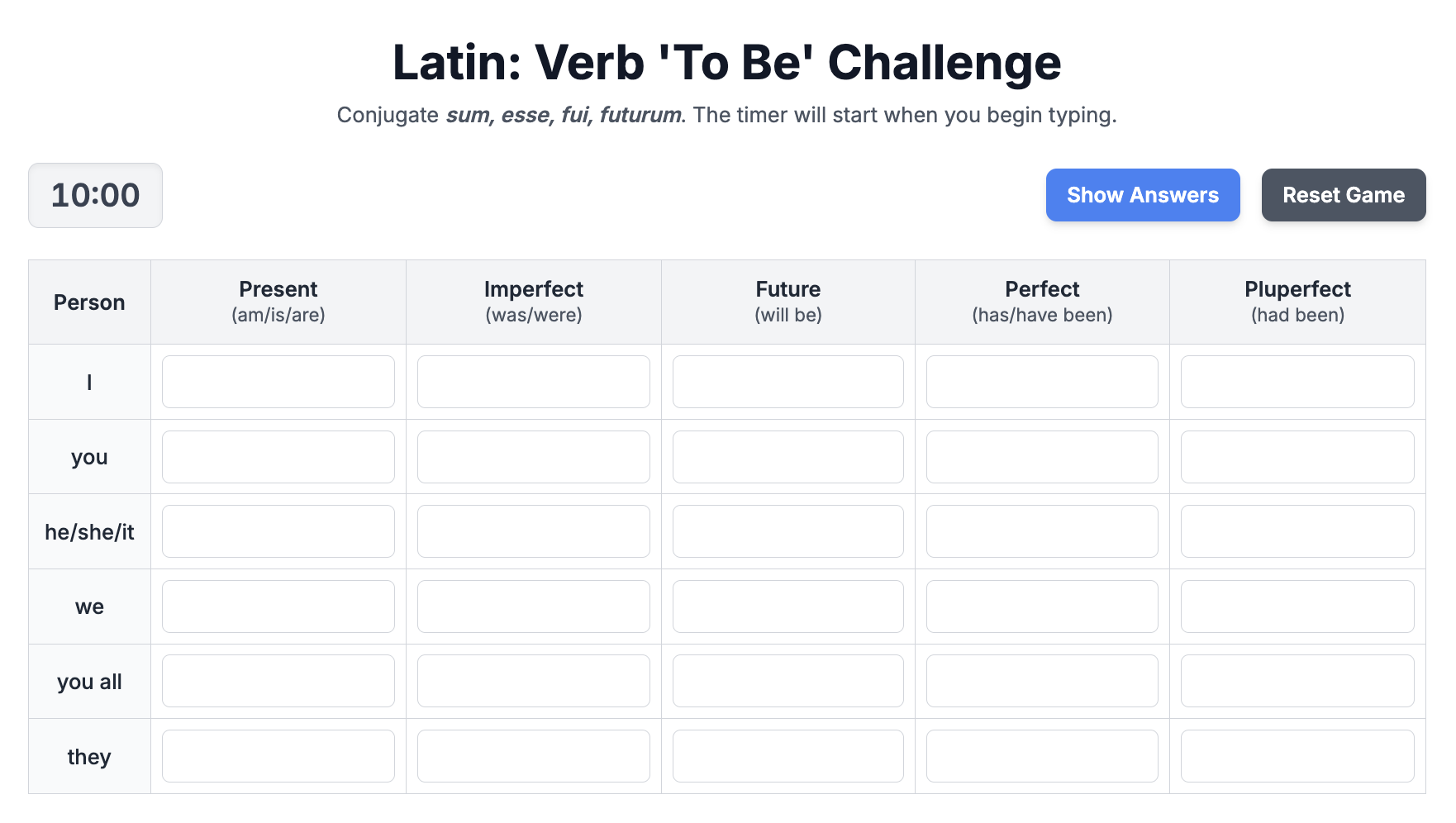
The next activity – Latin teachers wanting to be able to have student self check their work. With the help of uploading a PDF file of a chart, we were able to ask Gemini to create an activity where the moment the student starts entering in answers, the timer starts ticking and students are able to self check their work. This can be an alternative to a Kahoot!, Gimkit, or Blooket game. The idea down the road would be for this latin teacher to have a google site that contains all of these self checkers for students for each of the chapters in the class. A one stop shop. Below is a sample prompt that was put into Gemini.

“Code interactive tables on verb to be chart using the information provided in the pdf document. You will ask students to complete the table on verb to be under the present-am/is/are, imperfect-was/were, future-will be, perfect-was/werehas/have been and pluperfect-had been columns. Students will enter the information into the table cells. If they get it right, fill in the box green. Provide a count down timer from 10 minutes once they start. Provide a ‘show answers’ button to show answers as well as a reset game button to reset the game” – prompt with Google Gemini – September 12, 2025

To view the example on a Google Site, click HERE

‘Family Feud’ – Fun Advisory Activity

A third example pertains to a fun advisory game that advisors can play with their advisees. Our principal sent out a form that I put together asking staff to answer three questions. The three questions were:

What is one question you hear students ask you every day?

What is one thing that gets you through the day?

What’s the first thing you look forward to on summer vacation?

From those results, I asked Gemini to create a Family Feud style game. The idea is to then have advisories play the game to either compete against their own peers in advisory or against another advisory – but the topic is about their own teachers and their responses. Below is a sample prompt that was put into Gemini

“code a family feud game where 53 BHS staff members were surveyed with the top 6 answers on the board. there are three rounds of questions. The first question is “According to BHS staff members, name an essential item that gets them through the school day” The top six answers with the number of staff who said that answer are: Coffee – 19; Water – 9; Laptop – 4; Snacks – 3; Colleagues – 3; Music – 2. The second question for round two is “According to BHS staff members, name something that staff look forward to doing on the very first day of summer vacation” The top six answers are: Sleeping in – 25; Coffee – 6; beach – 3; Going for a walk – 2; gardening – 2; hiking – 2. The third question for round three is “Name a question that BHS staff hear from their students almost every single day”. The top six answers are: Is this graded? – 15; What time is it? – 6; What are we doing today? – 4; Can I go to the bathroom? – 3; Do you have a charger? – 3; Can we leave early today? when a student types in a response, if they have an answer, the answer reveals behind its spot with the number associated with it. If an answer is wrong, put a red x. Student is only allowed 3 red x’s before the other team gets to steal. if the team gets three strikes, allow one more guess to see if the other team gets an answer so that they can steal the points. Then provide a button to indicate which team should get the points. Then allow a reveal remaining button to show so see the remaining answers that were not figured out. Then allow users to go to the next question.” – prompt with Google Gemini – September 25, 2025

To view the example on a Google Site, click HERE

Three completely different examples…three completely different purposes, but I like how I’m able to take an idea that a teacher or myself might have and try and make it become reality with the assistance of Gemini. 

Workflow

In terms of workflow, these are the steps that you would use to help make something become a reality 

  • Come up with an idea 
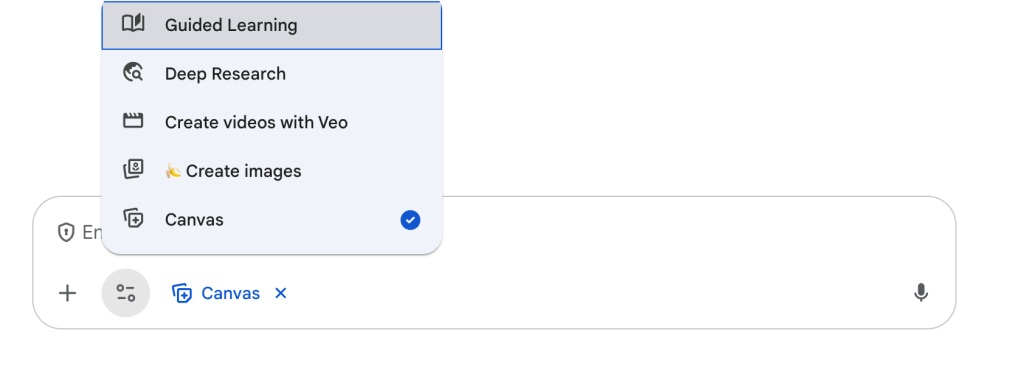
  • Open up Gemini and put in your prompt – make sure you have selected Canvas under the tool menu. Remember to be as specific as possible to help ensure that you will get a product that you’re looking. Don’t be surprised if you have to continue the conversation and go through several different versions. 
  • Preview your coded activity that Gemini has provided you.
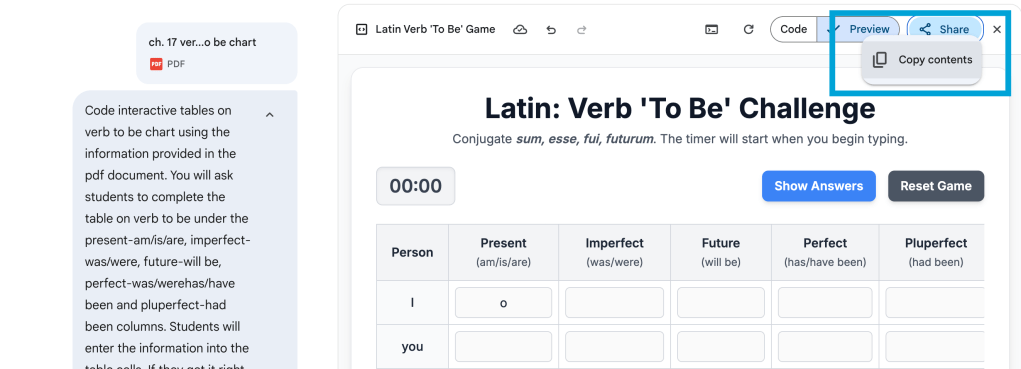
  • Copy the html code from the share button on the top right corner
  • Go to Google sites – as an editor, go to the top right corner and select the embed button, and paste your code
  • Once you are happy with your page on your site, don’t forget to publish or republish your website for others to view.

What ideas have you asked Gemini? What will you ask Gemini to do for you? If you have any questions feel free to reach out.

And that is my Spiel…

Goodbye 3 Inch Binders

This year I’m hitting a 15th year anniversary of being in the same role at the same school. Prior to this position, I taught high school mathematics for eight years. I actually taught almost every high school math course that there could be offered. When I made the transition to be becoming a Digital Learning Specialist, I saved every 3 inch binder full of materials, notes, and assessments for each class.

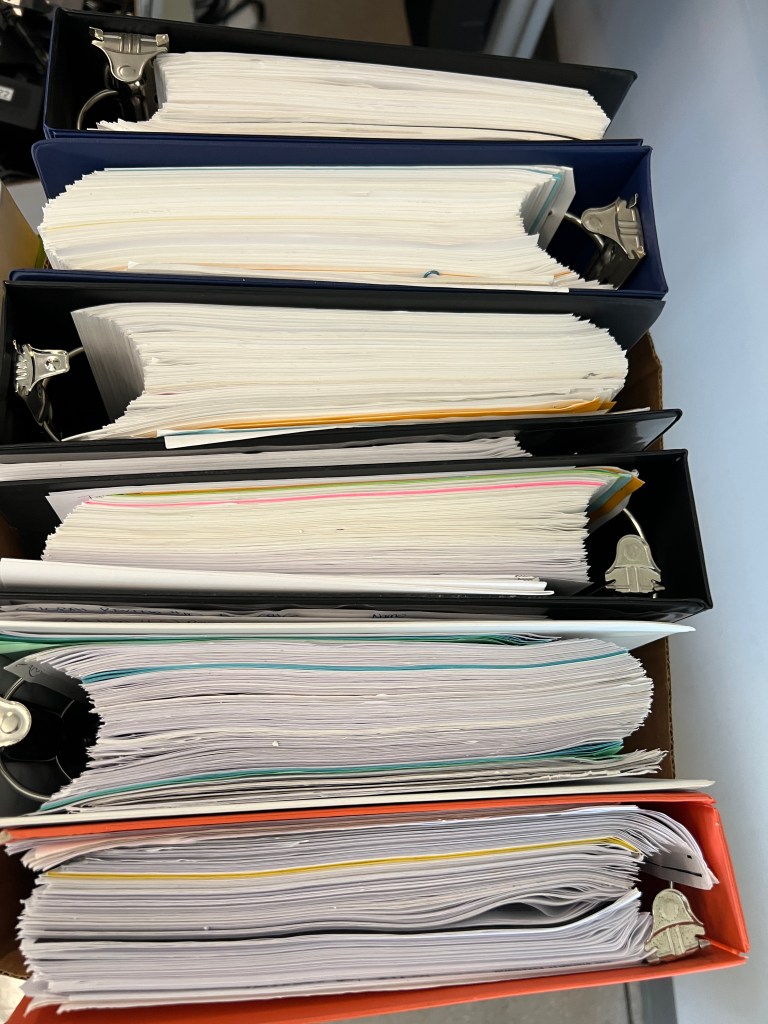
After 10 years, I slowly got rid of a few of those binders, but still managed to keep ten 3 inch binders. These binders consisted of two of my favorite courses, Algebra II Honors and Calculus. Algebra II Honors was that class that I just loved to teach. I love the content in it. I kept Calculus for a couple reasons – I appreciated the challenge that it gave me and in many instances, I had to spend hours upon hours upon hours, relearning calculus myself. I worked through and solved all of the problems that I was assigning my students. You just can’t wing it when teaching Calculus. As a result of this, the thought of just getting rid of that content due to the amount of hours I spent was very hard for me. Plus, there was always this idea in the back of my mind that well what if I do go back into the math classroom?

Seeing as though I’ve now hit year 15 of not teaching math, I think I can safely say I’m probably not gonna go back to the math classroom. But seeing these binders also made me think about how things have drastically changed over that time span. Everything that was done was done by paper and pencil/pen. Yes there was technology but it was not as easily accessible, especially in the world of mathematics. 15 years ago, not every teacher had their own laptop given to them. I can remember many of days where I was physically cutting paper and pasting those individually cut out problems and pasting them onto a sheet of paper to create an activity to be photocopied. All those hand written worksheets and activities that students received from me as well. That is mostly a thing in the past!

I also got to thinking that these binders are a physical representation of the hard work I spent into designing and running curriculum. Nowadays, all of that content is just hidden inside of our Google Drive in many different folders (or for some, not folders at all). I can only imagine how many folders that actually exist inside of my drive with the amount of files in each of those sub folders. Having things digitally just makes it a bit harder for us to actually visualize and understand the amount of work and dedication that’s been put into the curriculum that we teach each and every year. Seeing something physical makes it a lot easier to see the hard work and dedication.

I really did hate getting rid of these binders, but I have come to realize that

  • the curriculum in the binders would not be taught the same way that it was taught 15 years ago
  • I haven’t looked at it in 15 years and probably won’t ever again
  • these physical binders are no different then the digital folders I created 13 years ago that I have not looked at

Yes it was hard to throw away, but also a sense of peace as well. I know that this is not a normal type of post that I share on my blog, but felt it was important to reflect.

And that is my spiel…

2023 AI Reflections

What a year 2023 has been. So much learning. So much exploring. So much thinking. It’s been a year full of investigative work with artificial intelligence, more specifically generative AI. I feel like daily I was either having conversations with others on generative AI or exploring around with how it can potentially be used in the educational space. 

Back in the Spring of 2023, I found myself attending different webinars or trainings to learn from others. At staff meetings, the administration team at my high school gave me the opportunity to share learnings and discoveries to help guide staff in what was happening in 5-10 minutes. Trying to make sense of what was really happening. The Digital Learning Specialists and Librarians in the district were trying to get as far ahead of things as best as we could. It sure was an ‘AI race’ that we were experiencing.

Continue reading “2023 AI Reflections”

Magic Switch with Canva

It seems as though everyone is talking about generative AI, to some degree, these days. This blog post is not meant to talk about what generative AI is or how to come up with the best prompt. Rather, I want to talk about what Canva is calling Magic Switch.

In this short 2 minute video, I quickly show how one can take an existing Canva Presentation and have generative AI take that text content and convert it into a different format. For instance, Jess Gilcreast (high school librarian) and I had a 50 slide presentation that we gave to all high school teachers at the beginning of the school year as a base line for what generative AI is. It was the districts goal for all staff to be knowledgable.

With the announcement of Magic Switch a couple of weeks ago, I decided to take that presentation and ask generative AI to convert it into a poem. In about 3 minutes, a Canva Doc appears with a lengthy poem. I have to admit, I was amazed at what I saw. I felt as though the message was right on point with what we were sharing with our staff.

This has my mind going in a couple of places:

  • Perhaps this could be helpful for sharing out information to students or staff a different way to better connect with certain learners.
  • My brain is more on the math and science side of things. I love numbers. As a result of that, I would not necessarily spend time putting content in a poem format. However, if I could get some brainstorming ideas, why not dive in and give it a try.
  • This could also be helpful to just ask Canva to create a summary of text. Again, this could be helpful for some learners who just need to see the content in a different format. There are times where differentiating content is necessary or helpful. Here is a tool to help assist with just that.

Back in Spring 2023, I would we talking to staff about how we will be witnessing an “AI Race”. We are certainly living it. But regardless of that, it is important that we are finding appropriate uses of generative AI in education while always keeping in mind to never include PII (personal identifiable information). There is a time and place where generative AI can help assist with our work. There is a time where it can be meaningful. It is also important to remind one self that human intelligence should always be included and infused with generative AI work. I look forward to seeing more use cases of Canva generative AI tools in the future.

If you have any questions, or you want to talk more about how some of the magic tools in Canva can be used to help you as a teacher, you know where to find me.

And that is my spiel…