2023 AI Reflections

What a year 2023 has been. So much learning. So much exploring. So much thinking. It’s been a year full of investigative work with artificial intelligence, more specifically generative AI. I feel like daily I was either having conversations with others on generative AI or exploring around with how it can potentially be used in the educational space. 

Back in the Spring of 2023, I found myself attending different webinars or trainings to learn from others. At staff meetings, the administration team at my high school gave me the opportunity to share learnings and discoveries to help guide staff in what was happening in 5-10 minutes. Trying to make sense of what was really happening. The Digital Learning Specialists and Librarians in the district were trying to get as far ahead of things as best as we could. It sure was an ‘AI race’ that we were experiencing.

Continue reading “2023 AI Reflections”

Magic Switch with Canva

It seems as though everyone is talking about generative AI, to some degree, these days. This blog post is not meant to talk about what generative AI is or how to come up with the best prompt. Rather, I want to talk about what Canva is calling Magic Switch.

In this short 2 minute video, I quickly show how one can take an existing Canva Presentation and have generative AI take that text content and convert it into a different format. For instance, Jess Gilcreast (high school librarian) and I had a 50 slide presentation that we gave to all high school teachers at the beginning of the school year as a base line for what generative AI is. It was the districts goal for all staff to be knowledgable.

With the announcement of Magic Switch a couple of weeks ago, I decided to take that presentation and ask generative AI to convert it into a poem. In about 3 minutes, a Canva Doc appears with a lengthy poem. I have to admit, I was amazed at what I saw. I felt as though the message was right on point with what we were sharing with our staff.

This has my mind going in a couple of places:

  • Perhaps this could be helpful for sharing out information to students or staff a different way to better connect with certain learners.
  • My brain is more on the math and science side of things. I love numbers. As a result of that, I would not necessarily spend time putting content in a poem format. However, if I could get some brainstorming ideas, why not dive in and give it a try.
  • This could also be helpful to just ask Canva to create a summary of text. Again, this could be helpful for some learners who just need to see the content in a different format. There are times where differentiating content is necessary or helpful. Here is a tool to help assist with just that.

Back in Spring 2023, I would we talking to staff about how we will be witnessing an “AI Race”. We are certainly living it. But regardless of that, it is important that we are finding appropriate uses of generative AI in education while always keeping in mind to never include PII (personal identifiable information). There is a time and place where generative AI can help assist with our work. There is a time where it can be meaningful. It is also important to remind one self that human intelligence should always be included and infused with generative AI work. I look forward to seeing more use cases of Canva generative AI tools in the future.

If you have any questions, or you want to talk more about how some of the magic tools in Canva can be used to help you as a teacher, you know where to find me.

And that is my spiel…

2021 – Day 8 of Google – Sheets

On the eighth day of Google, we will look at a couple of aha moments from Google Sheets. Google Sheets is such a valuable tool to help us be efficient with data. I have found over the years that I have been able to improve my skillset in working with data. I by no means am an expert but I do enjoy learning new stuff. Did you know…

CELL HISTORY

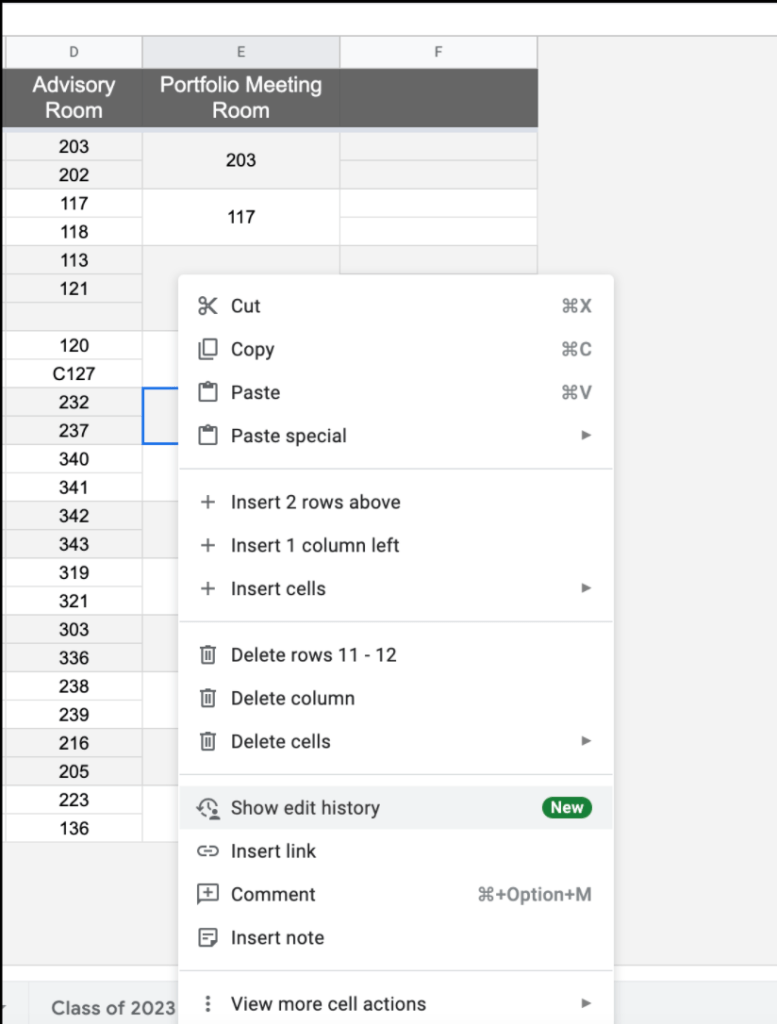
Did you know that you now have the ability to see edit history of particular cells? How to see this history?

  • Right click on a cell
  • Choose ‘show edit history’
  • A small window will appear with any edit history of that cell. You might notice a left/right arrow having you take a look at different versions of just that one cell.

I like that you have the ability to focus on one particular part of the Google Sheet rather than having to sort through everything to find what I are looking for.

Continue reading “2021 – Day 8 of Google – Sheets”

2021 – Day 5 of Google – YouTube

On the fifth day of Google, we will take a look into YouTube. Some of the features below are not necessarily all new ideas but ideas that are worth taking a second look at.

PLAYBACK SPEED

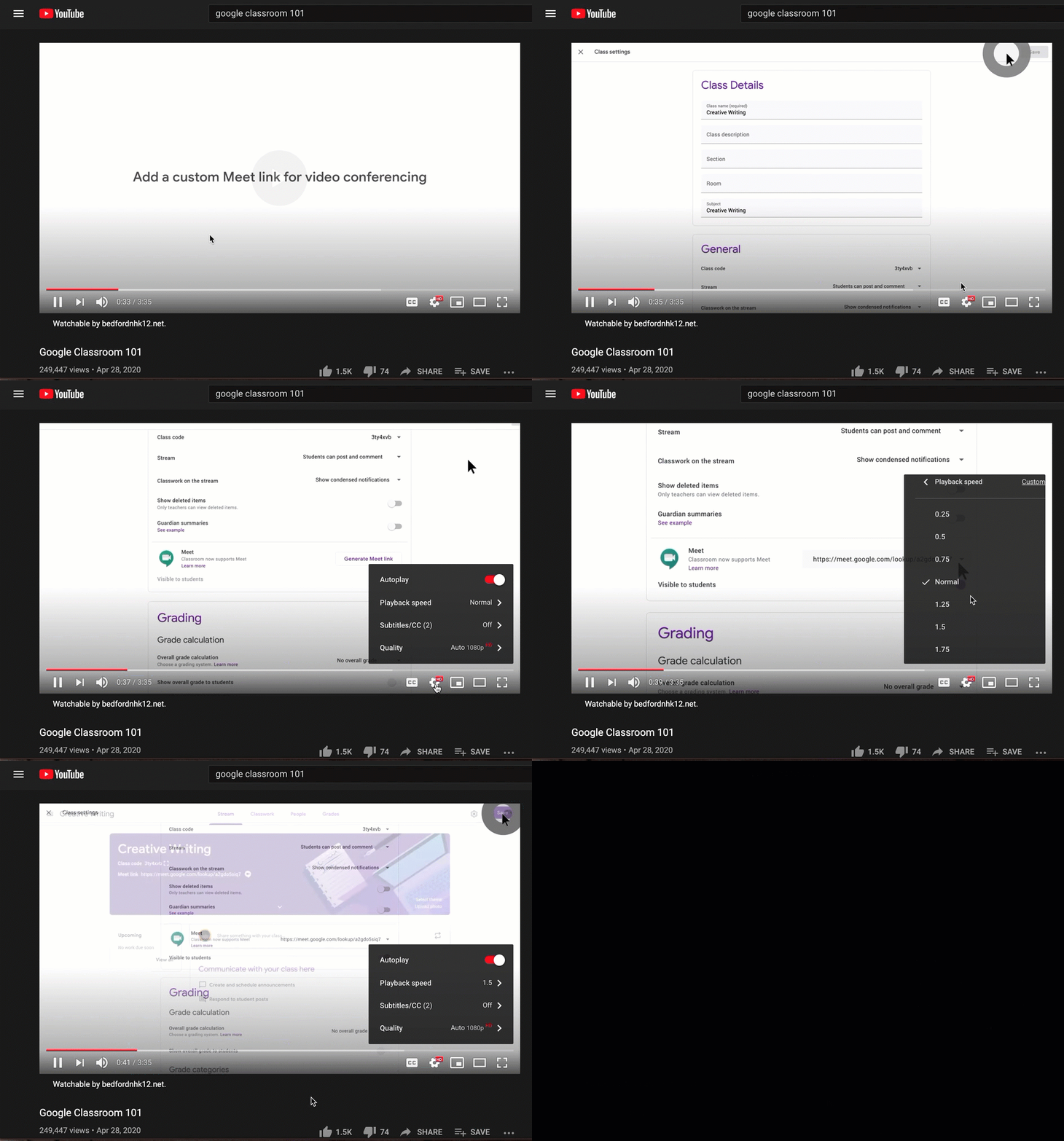
Ever in a situation where you want to speed through a video? Consider changing the speed by which it is played. Perhaps you are running out of time or you feel like you can get more out of the material if it is sped up. I find myself doing this more and more. If I see a video or webinar that I want to watch, and I see that it is 30 or more minutes, I will change the speed of the video.

Select the gear on the bottom of a YouTube video and change the playback speed to a faster speed. My suggestion is watching at 1.5 speed.

Continue reading “2021 – Day 5 of Google – YouTube”

2021 – Day 3 of Google – Calendar

On Day 3 of Google, we will take a look at Google Calendar. Perhaps some of these features can help streamline your workflow.

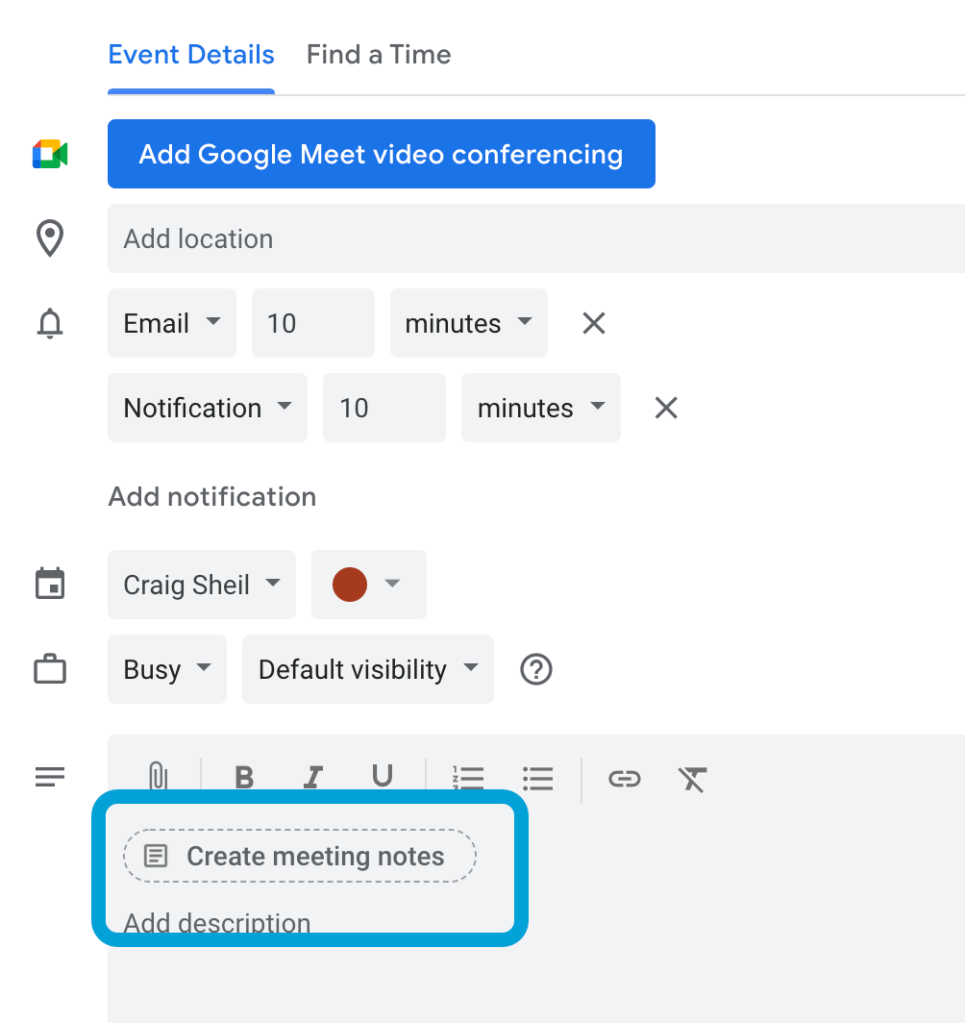
MEETING NOTES

When organizing a meeting, you now have the ability as the owner to initiate meeting notes. What I like about this, is that the file is named the name of the calendar invite. It also automatically creates a space for attendees to add notes as well as action items (that can then be crossed off once completed).

If you forget to add meeting notes, you have the ability to edit your calendar event and add it after the fact. All attendees to the calendar invite have access to the file as well as editing access.

To add meeting notes, select the ‘create meeting notes’ button in the meeting description section.

Continue reading “2021 – Day 3 of Google – Calendar”