10 Days of Google 2022

It’s that time of year again…sharing out random Google tips in a short fun manner. 10 Days of Google is here! However, this year, I am changing the way in which I am sharing out the information. I have decided to push myself and create my first canva website to showcase the information. Each day will ‘appear’ on its own page. Rather than create a blog post for each day, I will be posting twice – highlighting the first 5 days and the last 5 days.

10 Days of Google 2022

What can you expect on the first 5 days?

That is a great question! The following are highlighted in the first round:

  • Day 1: Google Docs – Linking files with Smart Chips and formatting text
  • Day 2: YouTube – Auto-translating text to a different language – this is especially helpful for students whose first language is not English or World Language teacher wanting to show a video in a different language but want to have English subtitles
  • Day 3: Tables in Google Docs – Features available with tables in Google Docs
  • Day 4: Google Form – Customizing font, embedding links and sharing survey results once completing a google form
  • Day 5: Google Classroom – Good reminders for students (and teachers) – copy a direct link to a Google Classroom assignment details, figure out what must be completed, and using originality report with Google Classroom assignments

This year, I have been spending a lot of time exploring around with the features Canva has to offer. This project has been great for me to learn how Canva websites work. I look forward to creating more in the future.

If you have any questions or want to learn more about what has been highlighted, you know where to find me.

And that is my Spiel…
Marketing Students, Data & Looker Studio

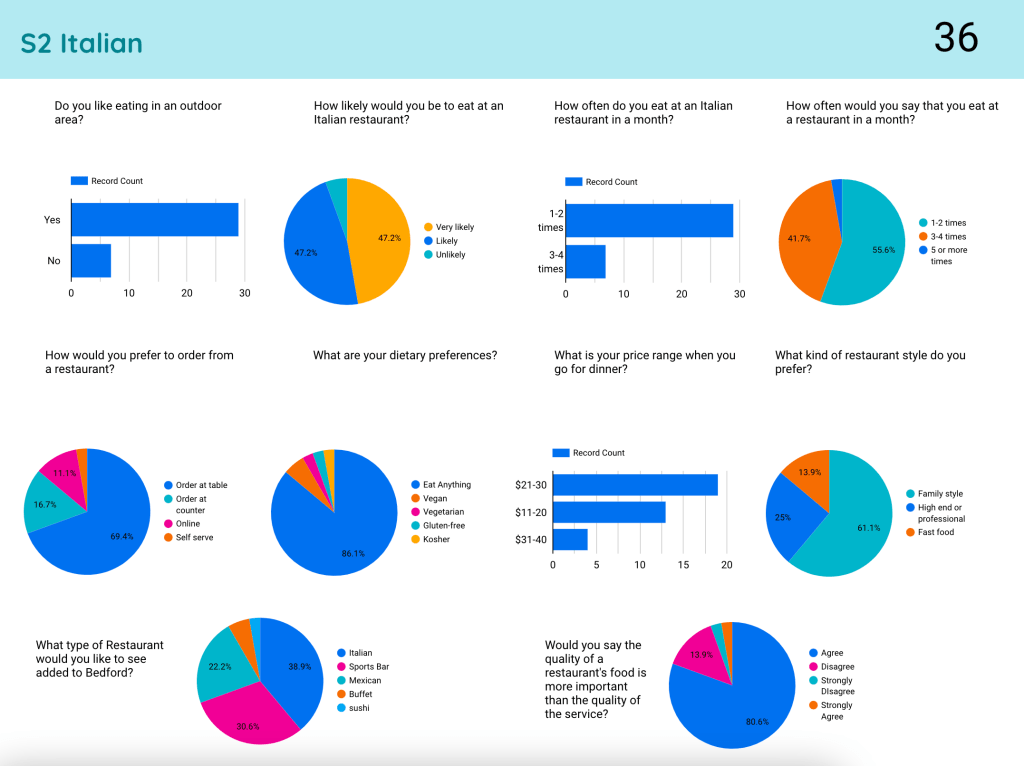
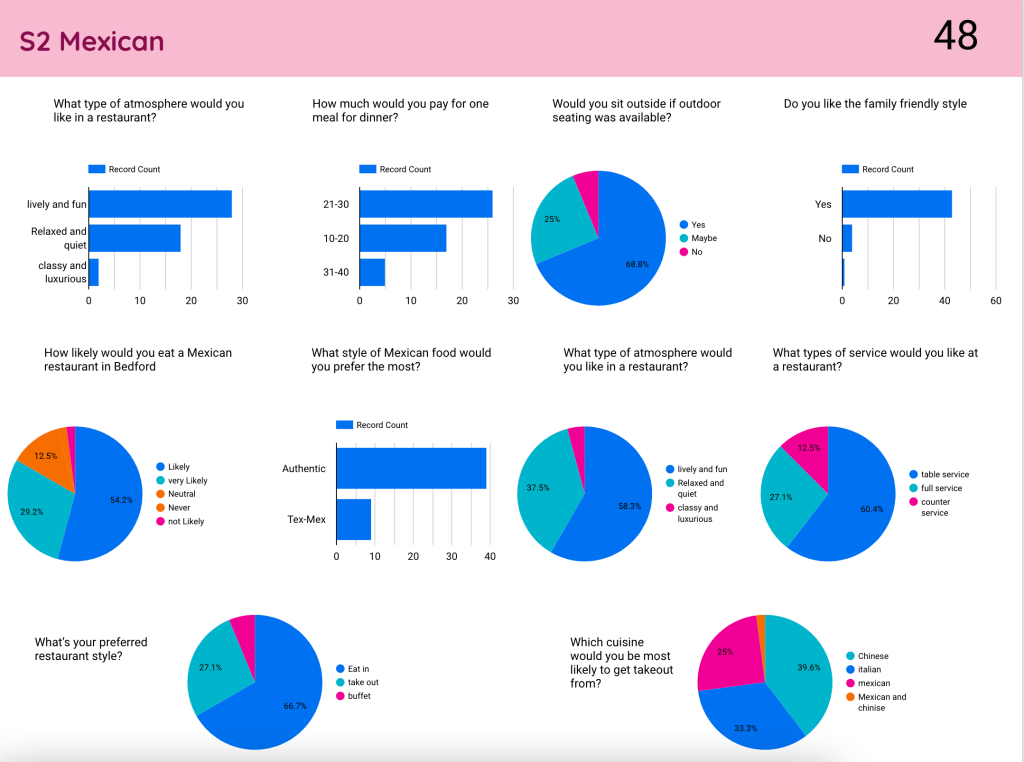
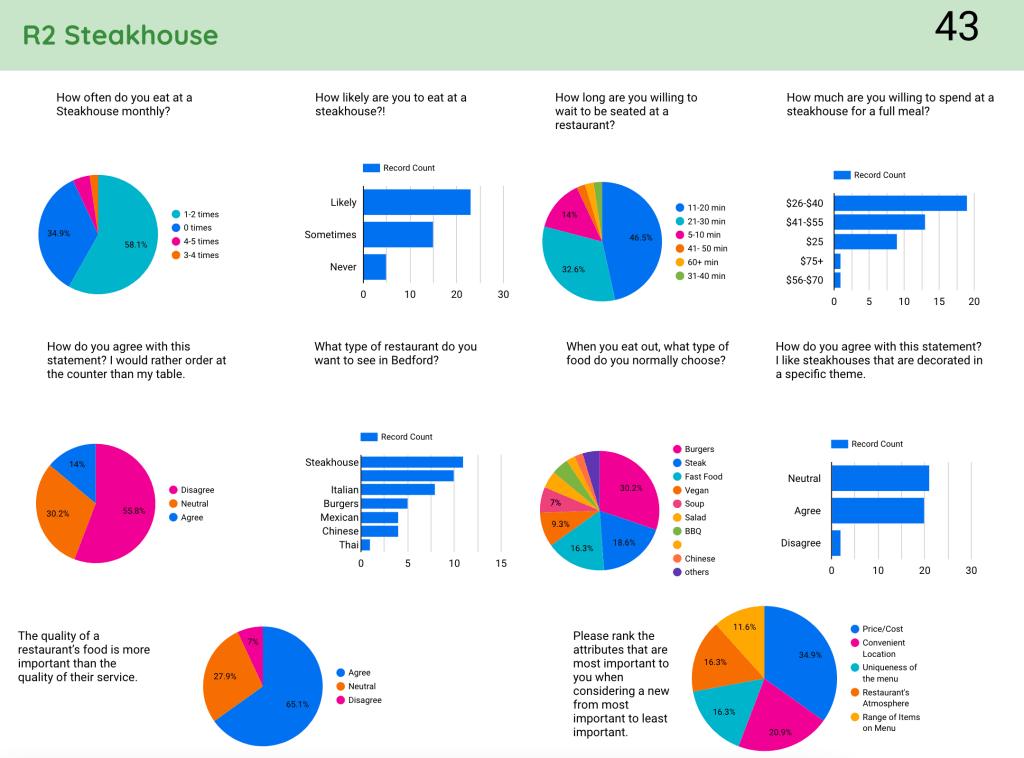
Recently, I had the opportunity to work with the marketing teacher in school, Mrs. Wilczewski, where we wanted to help students analyze their data collection. In groups, students were asked to research a particular restaurant that could be opened in town. Students organized focus groups to gather some information. Additionally, each group created a Google Form to gather feedback through survey questions. Students were then asked to create a presentation about their findings for a new restaurant in town. 

In talking more with Mrs. Wilczewski, we decided to curate all of the data from each of the 15 different restaurant groups and pull them into a Looker Studio (formerly known as Google Data Studio). To take a look at the Looker Studio, click HERE. A quick sample of what three of the pages look like can be seen below without launching the Looker Studio. NOTE: It is important to note that no PII is included with this Looker Studio. There is absolutely no student information being shared.

Continue reading “Marketing Students, Data & Looker Studio”

Flip Your Content in 90 seconds?

As a society, we are obsessed with consuming and creating content in short videos. As a digital learning specialist, I am wondering if we are reaching our learners and those that support our learners in the most effective way. Do we need to start thinking differently with how we present information? How can we do this in a safe manner that is efficient?

I co-teach a couple of graduate level courses for educators, and decided to start exploring alternatives to using TikTok. (Yes, our high school students are using the tool daily. Some of our teachers also use the tool for their own purposes or personal interests.) I decided to create a TikTok like video with Flip, using the mobile app. I have to be honest, I have been using Flip for years now, but I have not really focused much of my attention with the mobile app. While you don’t get all of the filters, songs and features that TikTok has to offer, Flip does do a good job in helping content creators make TikTok like videos.

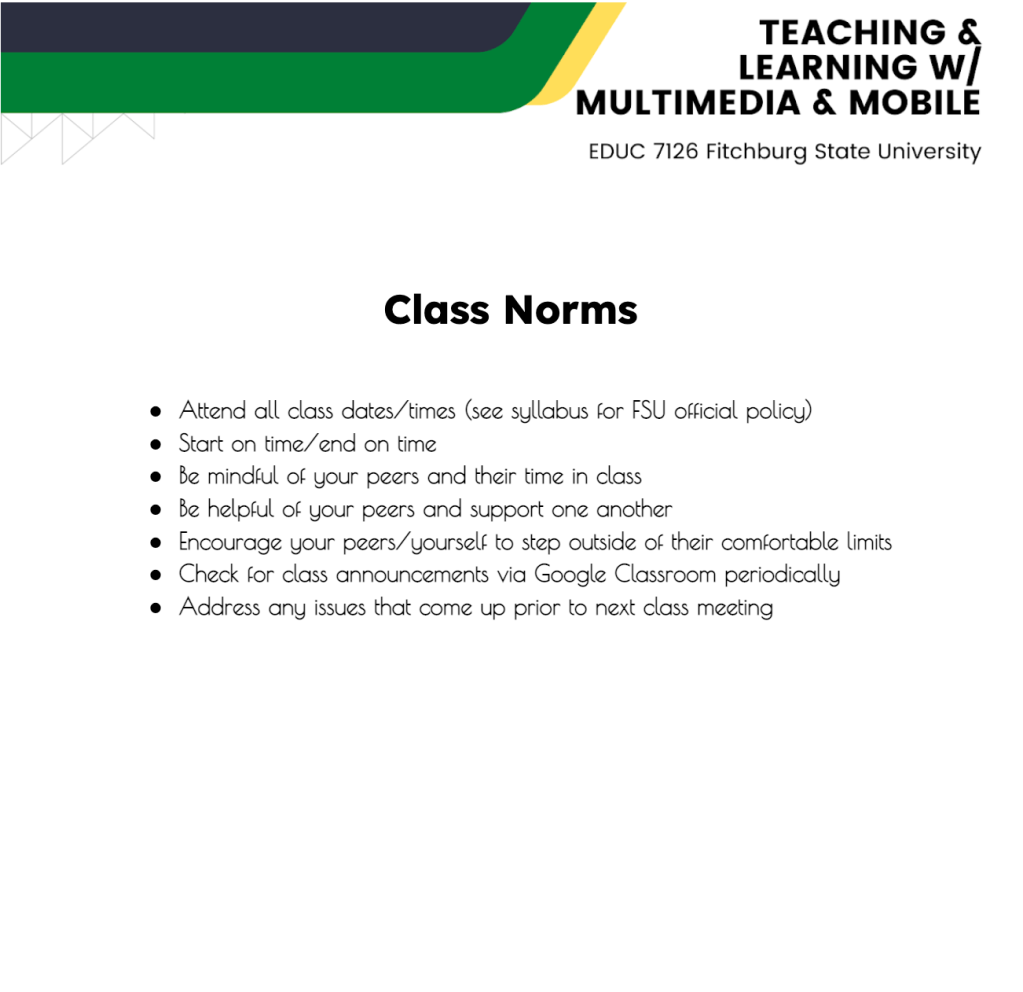
Below are the norms from the class. You decide which you would prefer to interact or consume with:

Visual/Auditory Example: I decided to create a short video highlighting the class norms for the course I taught. In less than 90 seconds, students were able to understand what was expected of them in class. Click HERE to view the Flip video or click HERE to view on YouTube.

Traditional Google Doc Example: Below is a screenshot of what the Google Doc looked like that was posted in Google Classroom.

Image of Google Doc Format

Some advantages:

  • One could argue that a video is more engaging than reading a list off of a google document
  • Ability to add humor or show some creativity
  • Mimics similar style videos students and parents are viewing on social media apps
  • Flip is a safe space where students (and teachers) can create without needing a ‘TikTok’ account
  • Eliminates a user name on the video (as seen on TikTok videos)
  • In less than 90 seconds, students were able to understand what was expected of them in class.

Some issues:

  • It could take way more time creating a 90 second video instead of typing a list in a google doc
  • Not all creators enjoy hearing their voice in play back in class
  • Not all creators are willing to use their own personal mobile device to make a video (mobile app)

I enjoyed exploring around with this idea. I plan to continue making similar style videos when I need to share out content with students this year. Perhaps we will get more students paying attention to information being shared with them? Perhaps not. Only time will tell.

If you yourself have been exploring around with this format, I would love to hear from you. And that is my Spiel…

Streamline Daily Data Collection

Our special educators at our high school have been asked to formally keep track of the services that they are giving students under their caseload next school year. My colleague, Kerri Lunn, and I sat with one of the case managers to truly understand all that they are being asked to document. We wanted to make sure that they will not spend hours each week documenting the necessary information.

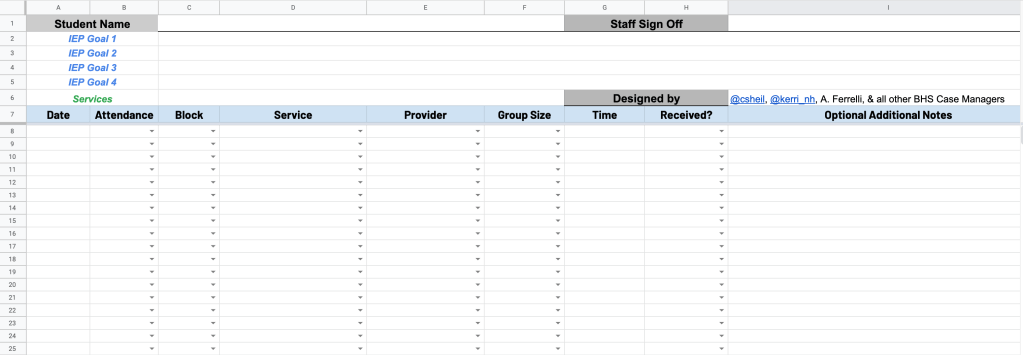
Based on the conversation, we landed on creating a spreadsheet template that each case manager can make a copy of. Things we considered:

  • Streamlined workflow so that they are making selections from as many drop down columns as possible – less typing the better
  • Each student has its own sheet tab so that finding information later in the year can be found easily
  • Use of column stats can give a quick overview of each student when meetings arise or questions are asked in an email throughout the school year
  • Workflow that all special education case managers can work with – we met with the whole team to get feedback and made adjustments based on their suggestions
Visual showing the spreadsheet view

Continue reading “Streamline Daily Data Collection”

Group Playlist Concept

Our Wellness II teachers wanted to give their Mental Health unit a ‘refresh’ look and feel. In the past, students were lectured about the topic as well as participated in class discussions. Recently, I had heard Amanda Sandoval’s keynote at the Spring CUE conference where she talked about how she has designed activities for students based off of Catlin Tucker’s playlist concept. Hence, where Group playlist comes from. 

Inspiration…

In the keynote, Amanda talks about how she loved station rotations, pre-COVID times, where students would participate in different activities at the same time. Then when the timer goes off, students moved from one station to the next. This was an approach that we used pre-covid times as well (In fact, I wrote a blog post about this in Feb 2020). Amanda shared how she feels Group Playlist works a bit better because:

  • Not all stations use up the same amount of time based on the activity.
  • Groups can complete tasks in any order that they want to complete them in.
  • Teacher is able to assess work as students complete tasks. Groups let the teacher know when they are done to do the ‘assessing’. This saves time on the teacher not having to look at the work after hours and it also gives students immediate feedback. Win for both parties!
Continue reading “Group Playlist Concept”