Creative Uses of Jamboard During COVID Times

Jamboard is quickly becoming a go to tool for the 2020 – 2021 school year. I know that I have written blog posts before on how we utilize the physical Jamboard Kiosks at our high school (can read more HERE). However, now that Jamboard can now be part of Google Meets, as well as teachers realizing they need a way for students to collaboratively work together in an efficient way online during remote blocks, they are finding ways to using the web version of Jamboard. While teachers are still finding it challenging to ‘read the room’ when they teach remotely, they like how Jamboard is helping tackle the collaborative aspect and getting student voices heard.

I have been impressed with how teachers at the high school have adapted their teaching with Jamboard. Below are are a couple of examples in different disciplines.

Math

Example 1: Mrs. D. Phillips and Mrs. Taylor were looking for a way to mimic an activity that they have had students do on big poster paper around the classroom with properities of angles in Geometry class. They decided that Jamboard would be their solution to getting students to working collaboratively during their remote teaching block. Each pair received their own copy of the Jamboard file.
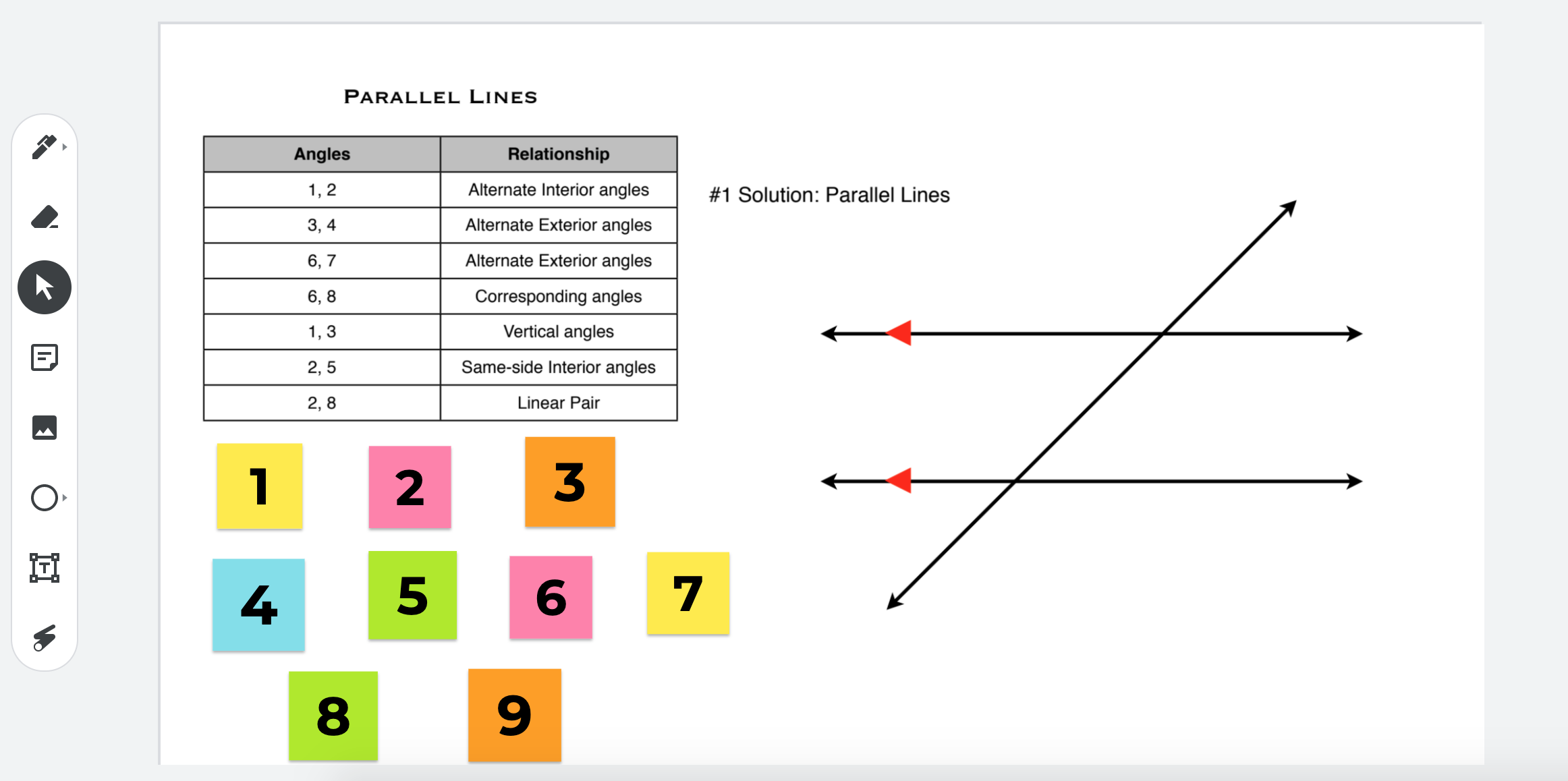
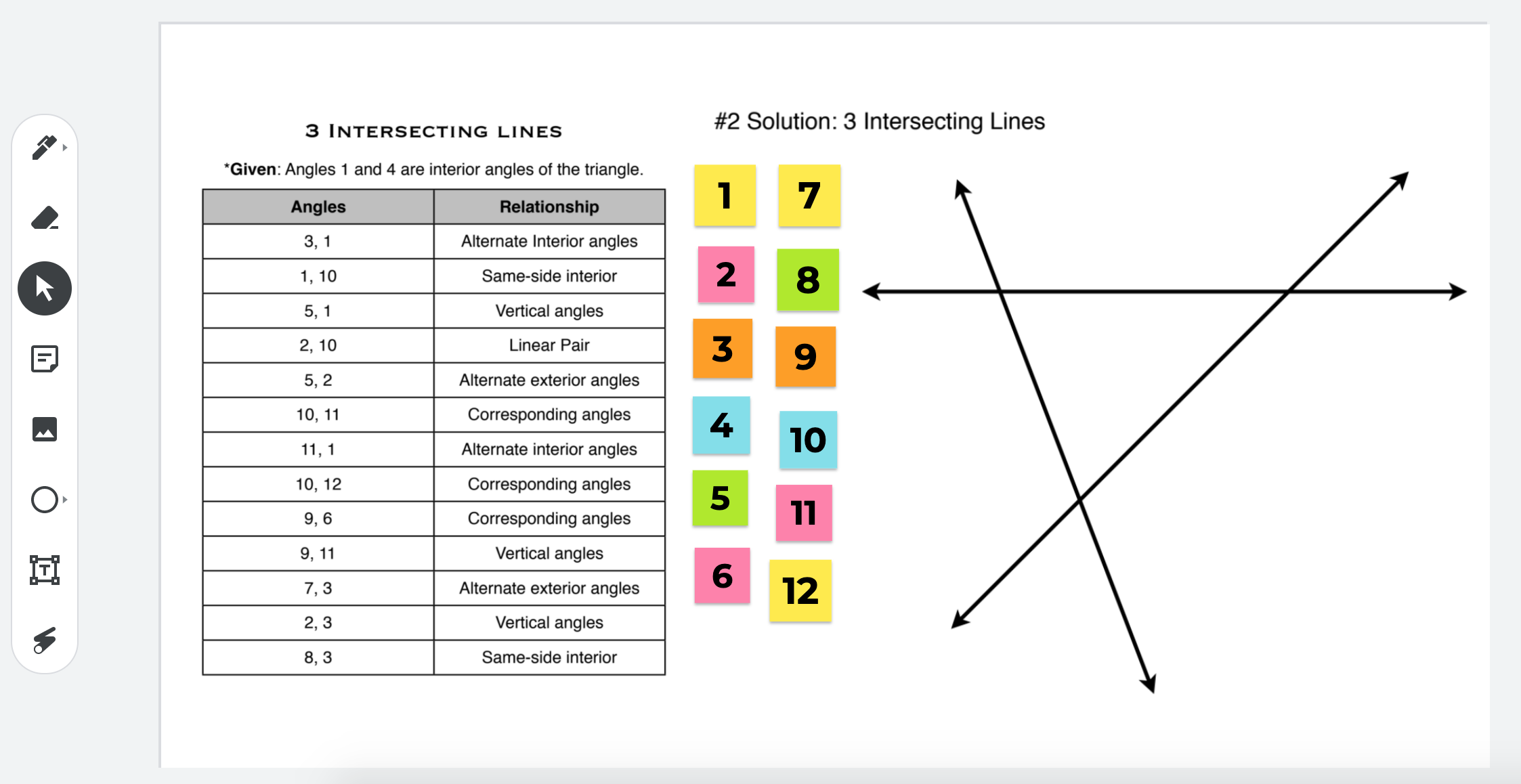
How was this created? The two teachers took screenshots of the the diagram as well as the angle information. They then created multiple stickies to match the angle names. Once each pair receives their copy, they have the ability to move the stickies to the appropriate spots. To see what this looks like in Jamboard, click HERE.

Continue reading “Creative Uses of Jamboard During COVID Times”
Welcoming Attendees to a Google Meet

I was good at remembering how many weeks we have been teaching remotely, but once we hit the double digits, I started to loose track. I think we must either be on week 10 or 11 by now. Never did I expect to be out for this long. I remember joining in on a webinar, back in late March, listening to teachers from overseas and how they had already been teaching remotely for 10 weeks. At that time, it was only week 2 for me. I thought, “wow, hope we won’t be in that situation!” Well, here we are.

For this blog post, I wanted to highlight how you could kick it up a notch when welcoming attendees to a Google Meet. By now, we all have either been participants or attendees of virtual meetings, conversations, lessons or webinars. It has become our new normal whether we like it or not.

Well, two weeks ago, I was fortunate enough to participate in a two part training series that Google put on for Google for Education Certified Trainers. Google had members of Future Design Schools deliver the training. We were exposed to ways in how we can support our colleagues using G-Suite tools with students in a remote setting in addition to how we could think about assessment differently. In a future blog post, I will address this more. However, what I really want to highlight right now is how I was welcomed in the Google Meet.

Continue reading “Welcoming Attendees to a Google Meet”

Week 5 of Remote Learning – Learning from Students


Well, time got away from me. I started strong with writing a blog post for the first two weeks of remote learning. Some how time didn’t allow me the opportunity to make the trend happen, weird huh? Lots of learning has happened over the past five weeks. This week, I would like to highlight something that I learned from a student.

Our principal shared with the staff that an instagram account was created in an effort to highlight our graduating senior class. It is so hard to be in this situation that we are all in. Hard for the graduates. Hard for the senior advisory teachers. Hard for the staff that are retiring this year. On this instagram account, each post highlights a different graduating senior with what they are planning on doing after they graduate. What a cool idea.

Continue reading “Week 5 of Remote Learning – Learning from Students”

Week 2 of Remote Learning – Keyboard Shortcuts


Many educators and students in New England are now experiencing their second week of remote learning. It’s been an adventure for sure. Now that most of the communication is happening solely online, I have found myself using more and more keyboard shortcuts. I am still the mouse user (I know that that this is a rarity, but it is true), but I have been trying to force myself to use more keyboard shortcuts to help save time. Think about all the clicks and dragging on a trackpad or mouse you do in a day. Think of all the seconds that it takes out of your day. Now add that up throughout the week. It becomes a substantial amount of time. Below are some helpful keyboard shortcuts that you might find useful.

Continue reading “Week 2 of Remote Learning – Keyboard Shortcuts”

Week 1 of #RemoteLearning

My Post

Wow! What a crazy time we are in right now. If you would have told me nine years ago when I started as a Digital Learning Specialist that we would move an entire school online in a two week period, I would have told you you were crazy. It is hard to put into words the experience. Very fortunate that we were given a full week to prepare for remote learning. As I write this blog post, we are ending our first full week.

Throughout the week, I have realized (and re-realized) a couple of things:

  • It is amazing at how different life is right now. I miss seeing my colleagues in person – there is something about waving hi, seeing how people are doing, co-planning with them. Sure a Google Meet is happening from time to time, but it is just not the same.
  • Our tech team in the district is very hard working and takes their roles very seriously with regards to making sure that the best experience is available for the entire BSD community.
  • Our teachers are willing and able to step up to challenges that are in front of them. Switching to remote learning is not a small feat by any means. It doesn’t matter how skilled or knowledgeable you are with technology. This is a lot of work for all staff. Meaningful activities to use? Screencasts to make or other video resources to use? Pacing? Lots and lots of ideas and questions are going through the minds of staff. Staff are wanting to make activities meaningful while being mindful that you can’t just do the same thing online.

Below are two ahas that happened in the first week that I would like to highlight:

Continue reading “Week 1 of #RemoteLearning”