10 Days of Google 2020

Images from a slidesgo template

Here we go…back at it for a fourth straight year. As I have done in the past, I will be sharing different tips and tricks relating to the world of Google, starting Monday, December 7, 2020. My hope is that over the course of the ten days, you will find something that is new to you that you never knew you could do with Google or a great reminder of something you knew about but yet have tried it out.

While I will be blogging each day, I will also curate all blog posts in a single Google Drawing for ease. To view this Google Drawing in another window, click HERE. If you have any tips, ideas, or suggestions, let me know! Here is to a great holiday season for you and your family and that 2020 ends on a high note.

And that is my Spiel…

Supporting Curriculum & Pedagogy

All educators can agree on one thing. It has been an interesting nine months. I support teachers in a high school where students and teachers are participating in a hybrid model. Students show up to school for a class in the morning. Then in the afternoon, they participate in remote blocks online.

Teaching remotely is still a ‘new thing’ for all of us, regardless of the fact that we went remote back in March. Let’s face it, expectations were different and the curriculum taught was also different. All educators are still trying to figure out what works and does not work in this remote setting.

In an effort to support teachers, Jess Gilcreast, high school librarian, and I decided that we should curate all of the great resources that we are discovering on Twitter and hearing about in house from our colleagues. Sometimes, just finding the right template or layout of a task can help streamline things or help make planning that much better. While, Jess and I don’t have all of the answers, our hope is that with a bit of organization we can help staff.

Continue reading “Supporting Curriculum & Pedagogy”

Creative Uses of Jamboard During COVID Times

Jamboard is quickly becoming a go to tool for the 2020 – 2021 school year. I know that I have written blog posts before on how we utilize the physical Jamboard Kiosks at our high school (can read more HERE). However, now that Jamboard can now be part of Google Meets, as well as teachers realizing they need a way for students to collaboratively work together in an efficient way online during remote blocks, they are finding ways to using the web version of Jamboard. While teachers are still finding it challenging to ‘read the room’ when they teach remotely, they like how Jamboard is helping tackle the collaborative aspect and getting student voices heard.

I have been impressed with how teachers at the high school have adapted their teaching with Jamboard. Below are are a couple of examples in different disciplines.

Math

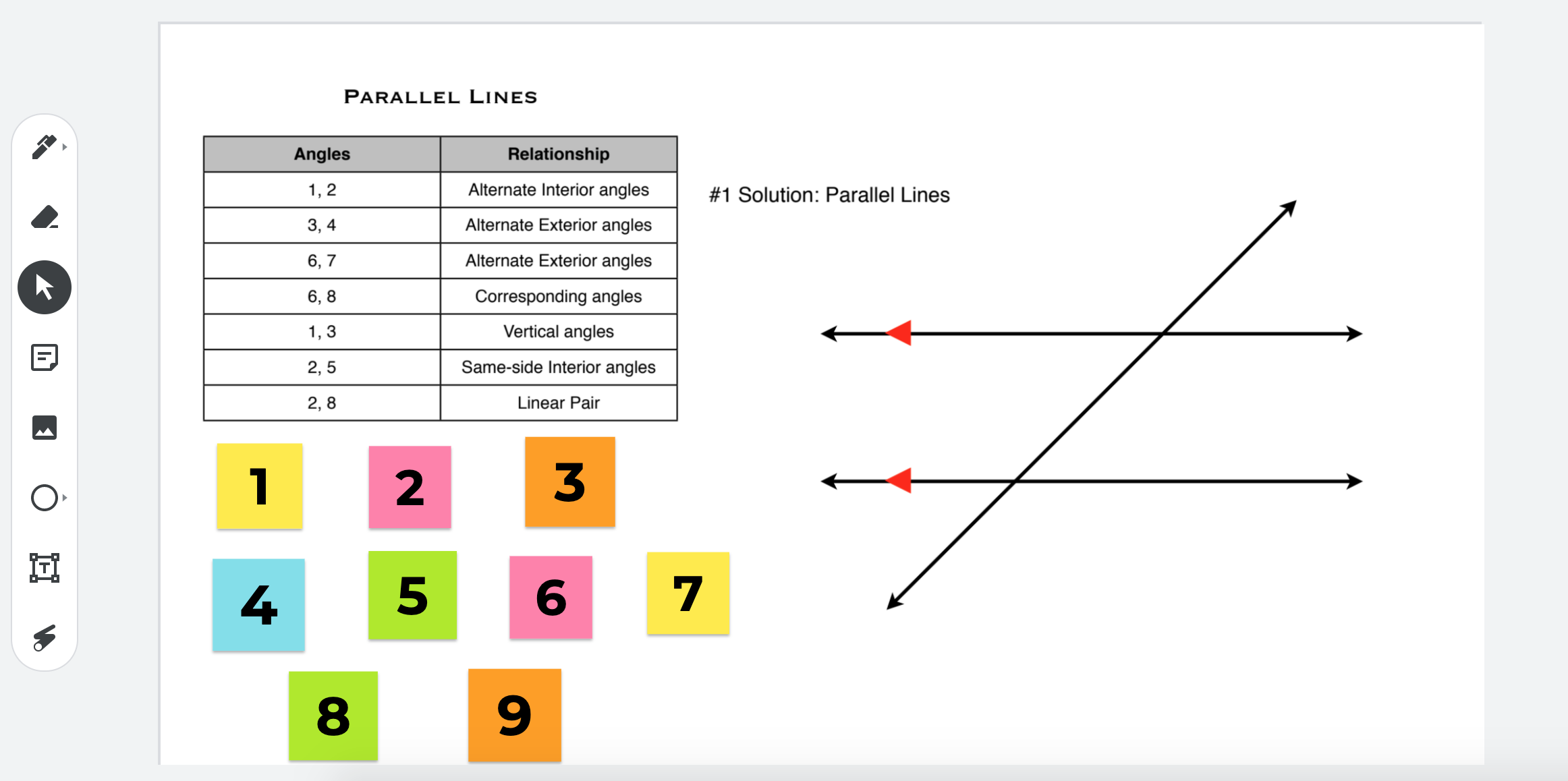
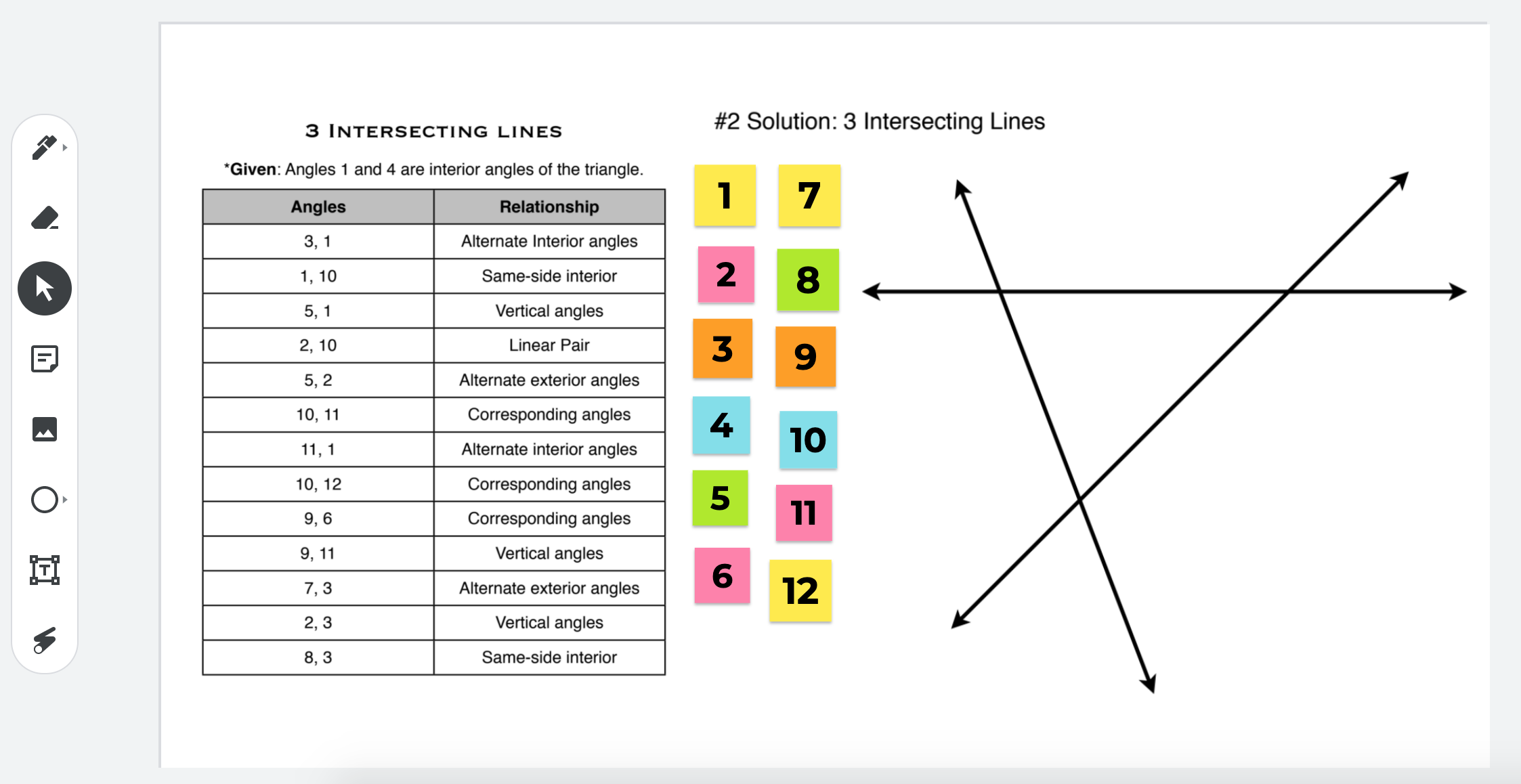
Example 1: Mrs. D. Phillips and Mrs. Taylor were looking for a way to mimic an activity that they have had students do on big poster paper around the classroom with properities of angles in Geometry class. They decided that Jamboard would be their solution to getting students to working collaboratively during their remote teaching block. Each pair received their own copy of the Jamboard file.

How was this created? The two teachers took screenshots of the the diagram as well as the angle information. They then created multiple stickies to match the angle names. Once each pair receives their copy, they have the ability to move the stickies to the appropriate spots. To see what this looks like in Jamboard, click HERE.

Continue reading “Creative Uses of Jamboard During COVID Times”

Welcoming Attendees to a Google Meet

I was good at remembering how many weeks we have been teaching remotely, but once we hit the double digits, I started to loose track. I think we must either be on week 10 or 11 by now. Never did I expect to be out for this long. I remember joining in on a webinar, back in late March, listening to teachers from overseas and how they had already been teaching remotely for 10 weeks. At that time, it was only week 2 for me. I thought, “wow, hope we won’t be in that situation!” Well, here we are.

For this blog post, I wanted to highlight how you could kick it up a notch when welcoming attendees to a Google Meet. By now, we all have either been participants or attendees of virtual meetings, conversations, lessons or webinars. It has become our new normal whether we like it or not.

Well, two weeks ago, I was fortunate enough to participate in a two part training series that Google put on for Google for Education Certified Trainers. Google had members of Future Design Schools deliver the training. We were exposed to ways in how we can support our colleagues using G-Suite tools with students in a remote setting in addition to how we could think about assessment differently. In a future blog post, I will address this more. However, what I really want to highlight right now is how I was welcomed in the Google Meet.

Continue reading “Welcoming Attendees to a Google Meet”

Week 5 of Remote Learning – Learning from Students


Well, time got away from me. I started strong with writing a blog post for the first two weeks of remote learning. Some how time didn’t allow me the opportunity to make the trend happen, weird huh? Lots of learning has happened over the past five weeks. This week, I would like to highlight something that I learned from a student.

Our principal shared with the staff that an instagram account was created in an effort to highlight our graduating senior class. It is so hard to be in this situation that we are all in. Hard for the graduates. Hard for the senior advisory teachers. Hard for the staff that are retiring this year. On this instagram account, each post highlights a different graduating senior with what they are planning on doing after they graduate. What a cool idea.

Continue reading “Week 5 of Remote Learning – Learning from Students”