
Creative Uses of Jamboard During COVID Times

Jamboard is quickly becoming a go to tool for the 2020 – 2021 school year. I know that I have written blog posts before on how we utilize the physical Jamboard Kiosks at our high school (can read more HERE). However, now that Jamboard can now be part of Google Meets, as well as teachers realizing they need a way for students to collaboratively work together in an efficient way online during remote blocks, they are finding ways to using the web version of Jamboard. While teachers are still finding it challenging to ‘read the room’ when they teach remotely, they like how Jamboard is helping tackle the collaborative aspect and getting student voices heard.

I have been impressed with how teachers at the high school have adapted their teaching with Jamboard. Below are are a couple of examples in different disciplines.

Math

Example 1: Mrs. D. Phillips and Mrs. Taylor were looking for a way to mimic an activity that they have had students do on big poster paper around the classroom with properities of angles in Geometry class. They decided that Jamboard would be their solution to getting students to working collaboratively during their remote teaching block. Each pair received their own copy of the Jamboard file.
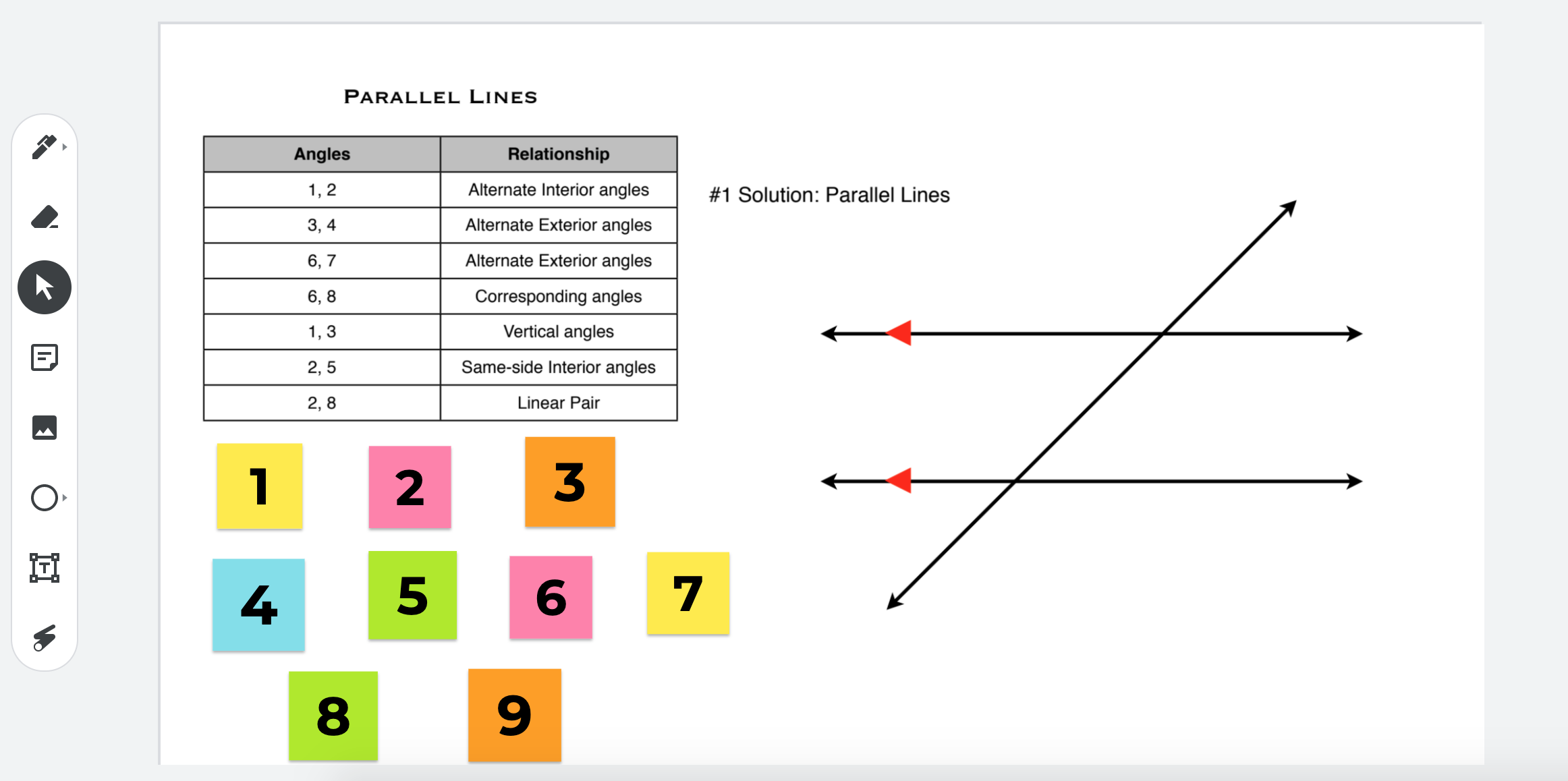
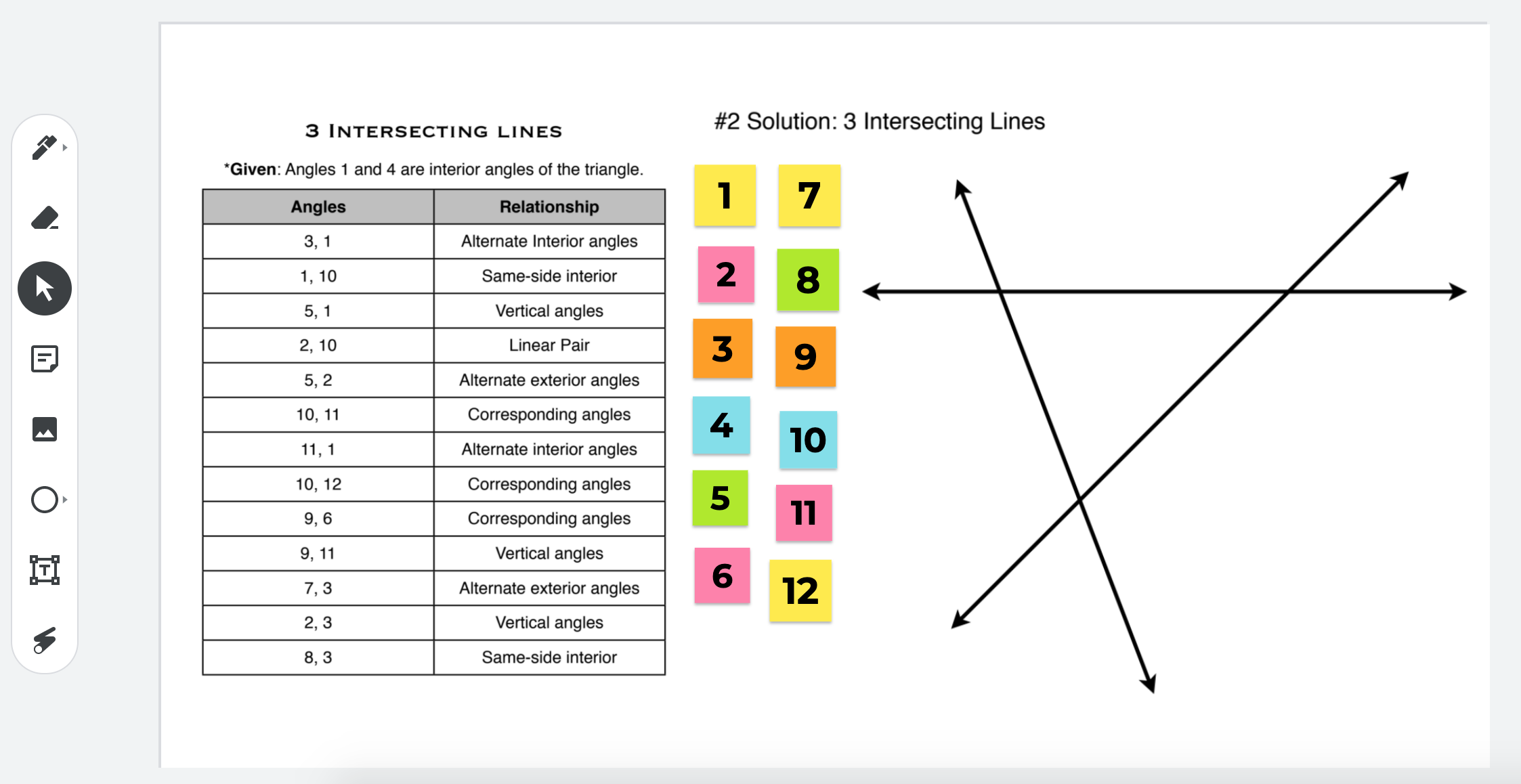
How was this created? The two teachers took screenshots of the the diagram as well as the angle information. They then created multiple stickies to match the angle names. Once each pair receives their copy, they have the ability to move the stickies to the appropriate spots. To see what this looks like in Jamboard, click HERE.

Continue reading “Creative Uses of Jamboard During COVID Times”

Station Rotations

Screen Shot 2020-02-10 at 5.08.01 PM

(Excited that Jess Gilcreast is a co-blog post writer for this post)

Station Rotations: A way to move from teacher lead learning to student lead learning. Our high school has 77 minute blocks. Students don’t want to listen to teachers talk the entire time and teachers don’t necessarily want to deliver content to students for the entire time either. 

Jess Gilcreast, high school librarian, and I have been working with humanities teachers to re-think how to deliver introduction content for a particular unit. Below you will find resources and activities that were completed in a sophomore humanities course. We are both very proud of what was accomplished.

Continue reading “Station Rotations”

Day 3 of Google 2019 – Google Keep

Screen Shot 2019-12-01 at 6.52.57 AM.pngFor the third day of Google, we will take a closer look at Google Keep (keep.google.com or you can find it in the waffle). There are many staff members who use Google Keep on a daily basis to keep track of their to do lists, whether individually or collaboratively. There is something about being able to cross and item off the list.
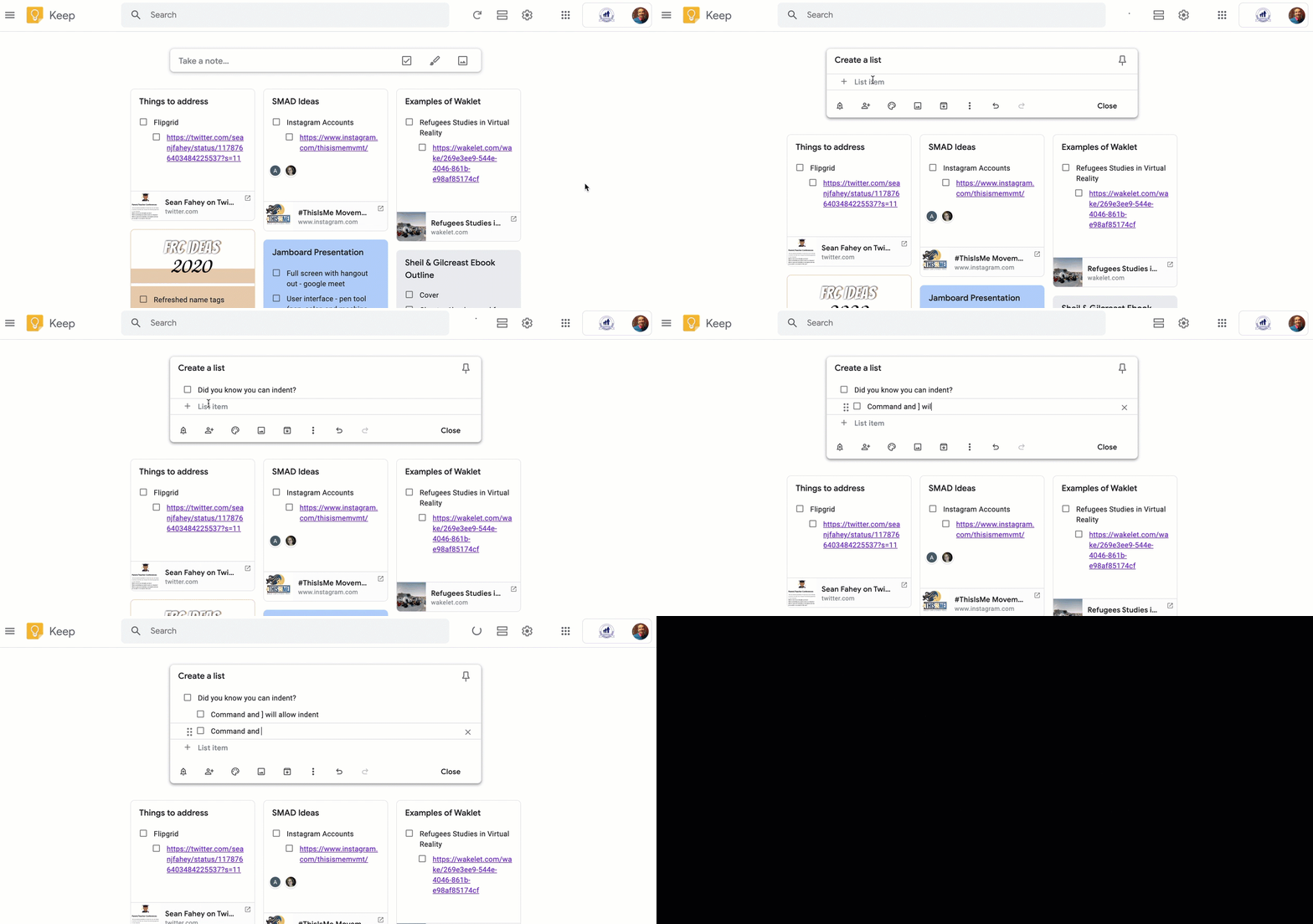
 

Creating Nested Lists

Did you know that you can created nested lists? When you want to use the indent feature, use the following keys:

Mac User: Command and ]

Chromebook User: Control and ]

When you want to un-indent you use the following keys:

Mac User: Command and [

Chromebook User: Control and [

2019-11-01_13-46-40

Continue reading “Day 3 of Google 2019 – Google Keep”

Day 2 of Google 2019 – Google Chrome

Screen Shot 2019-12-01 at 6.54.02 AM.pngDay two of Google focuses on the browser, Chrome. Today we will dive into two features that are good to know.

UPDATING CHROME

From time to time, you may notice that a green, yellow, orange, or red arrow will show up on the top right corner of your Chrome Browser. It is important to pay attention to this when it shows up. Chrome is letting you know that it is time to update the browser itself. (If you see an exclamation point, one of your Chrome extensions needs attention as a setting/update must be addressed.) For those of you who are worried that you will loose your open tabs, have no fear, they will pop back up! Do the updates as soon as possible by selecting the arrow and updating the browser. It is important that your browser is as updated as possible so that it is as secure as possible.

Continue reading “Day 2 of Google 2019 – Google Chrome”

Google Data Studio: Interact with your Data

Screen Shot 2019-12-02 at 10.10.20 AM.png

Last February, I had the opportunity to attend SXSWedu Conference in Austin, TX. Google set up a space at the conference where attendees would walk through different Google activities over the span of 45 minutes. Each activity pertained to a common theme of recycling. While attendees were waiting to experience the three different stations, we were asked to fill out a Google Form and answer questions. Once submitted, we were brought to an infographic showcasing data from all those that had already completed the form. The infographic was constantly being updated. I thought that this was really cool taking data to the next level. Yes I have heard of infographics before, but I had not seen infographics being updated in real time. It was VERY COOL. I noticed that the tool that was used to make this happen was something called Google Data Studio (datastudio.google.com). I knew that this was going to be a future challenge for myself to take a look at. 

Wouldn’t you know, October arrived and I had yet to push myself to play around with Google Data Studio. It is amazing how quickly time flies by. Thankfully, it was brought to my attention that Laura Tilton was offering a one day workshop on the tool. 

I can’t say enough with how cool and useful this tool is. Let’s put things into perspective. 

Continue reading “Google Data Studio: Interact with your Data”